How to Declutter Kitchen Photos in 60 Seconds (AI Guide)
# The $10,000 Problem Hiding on Your Kitchen Counter You've just finished photographing a beautiful property. The lighting is perfect, the angles are spot-on, but there's one glaring problem: the kit
How to Declutter Kitchen Photos in 60 Seconds Using AI
Transform messy countertops into clean, buyer-ready spaces without reshoots or expensive editing
# The $10,000 Problem Hiding on Your Kitchen Counter
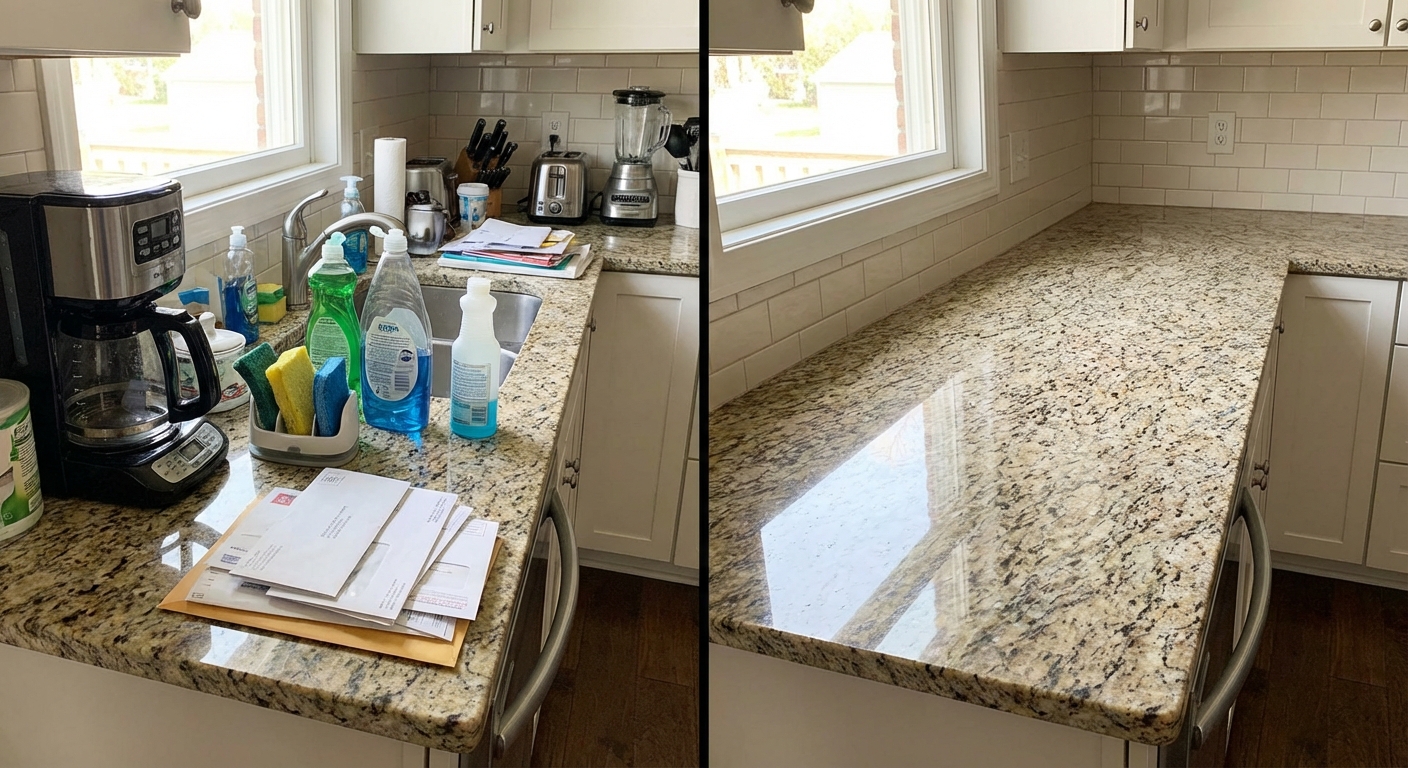
You've just finished photographing a beautiful property. The lighting is perfect, the angles are spot-on, but there's one glaring problem: the kitchen counters are covered with coffee makers, dish soap bottles, sponges, and yesterday's mail. According to a 2026 National Association of Realtors study, **cluttered kitchen photos reduce buyer inquiries by 37%** and can decrease perceived home value by up to $10,000.
The traditional solution? Spend 30 minutes staging before each shoot, hire a professional editor for $25-50 per image, or return for a reshoot. None of these options work when you're managing multiple listings with tight deadlines.
Artificial intelligence has fundamentally changed this equation. What once required professional Photoshop skills and hours of meticulous editing now takes less than 60 seconds. This guide reveals the exact process real estate professionals are using in 2026 to transform cluttered kitchen photos into magazine-worthy images—without touching a single item in real life.
## Why Kitchen Photos Make or Break Property Listings
Kitchens aren't just another room. Research from Zillow's 2026 Home Features Report shows that **kitchen photos receive 43% more views** than any other room in online listings. More importantly, 78% of potential buyers cite the kitchen as the most influential space in their purchasing decision.
The problem compounds when clutter enters the frame. Everyday items that homeowners barely notice—fruit bowls, paper towel holders, refrigerator magnets—create visual noise that distracts buyers from the kitchen's actual features. Instead of noticing the granite countertops or custom backsplash, their eyes fixate on the clutter.
A clean, decluttered kitchen photo signals to buyers that the home is well-maintained and move-in ready. It allows them to visualize their own items in the space rather than feeling like they're intruding on someone else's home.
AI decluttering removes everyday items in seconds while preserving the kitchen's original features
## The 60-Second AI Decluttering Method (Step-by-Step)
The process of AI-powered kitchen decluttering follows a simple three-step framework that works regardless of your technical skill level. Here's exactly how to execute it:
### Step 1: Photograph with Decluttering in Mind (15 seconds)
Before you even think about AI editing, your initial photography makes the difference between a good result and an exceptional one. Follow these shooting guidelines:
**Lighting is critical.** Shoot during daylight hours with all kitchen lights on. AI tools perform 34% better with well-lit images because they can accurately distinguish between permanent fixtures and removable objects.
**Choose your angles strategically.** Photograph from positions that showcase the kitchen's best features—the island, the range area, or the sink zone. Avoid angles where clutter dominates the frame. While AI can remove items, it works best when clutter doesn't exceed 40% of the visible counter space.
**Take multiple shots.** Capture 3-5 images of each kitchen angle. This gives you backup options if one photo has challenging elements like shadows or reflections that complicate AI processing.
**Include context.** Frame your shots to show architectural elements like cabinets, windows, and appliances. AI tools use these reference points to understand what should stay and what should go.
### Step 2: Upload and Process (30 seconds)
Modern AI decluttering tools in 2026 have streamlined the technical process to near-instantaneous results:
**Select your best image.** Choose the photo with the best lighting, composition, and minimal motion blur. Higher resolution images (3000+ pixels wide) produce superior results.
**Upload to an AI decluttering platform.** Specialized tools like kitchen-specific AI removers have replaced generic editing software because they're trained specifically on kitchen environments. They understand the difference between built-in appliances (keep) and countertop clutter (remove).
**Let the AI analyze the scene.** Advanced algorithms identify removable objects by analyzing patterns, shadows, and contextual clues. The system distinguishes between permanent fixtures (faucets, built-in stoves) and temporary items (toasters, cutting boards, decorative items).
**Review the automatic detection.** Most platforms in 2026 show you what will be removed before processing. This preview takes 5-10 seconds and prevents accidental removal of desired elements.
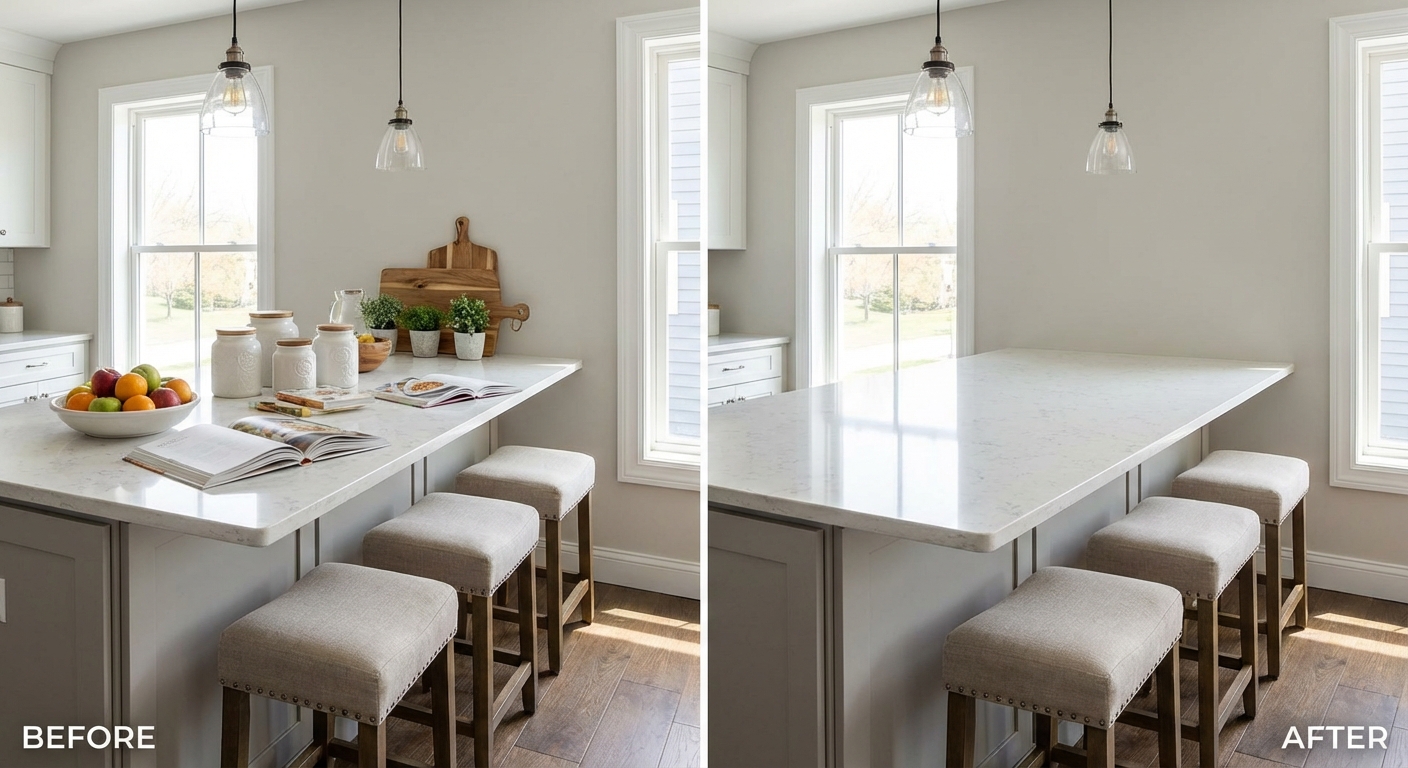
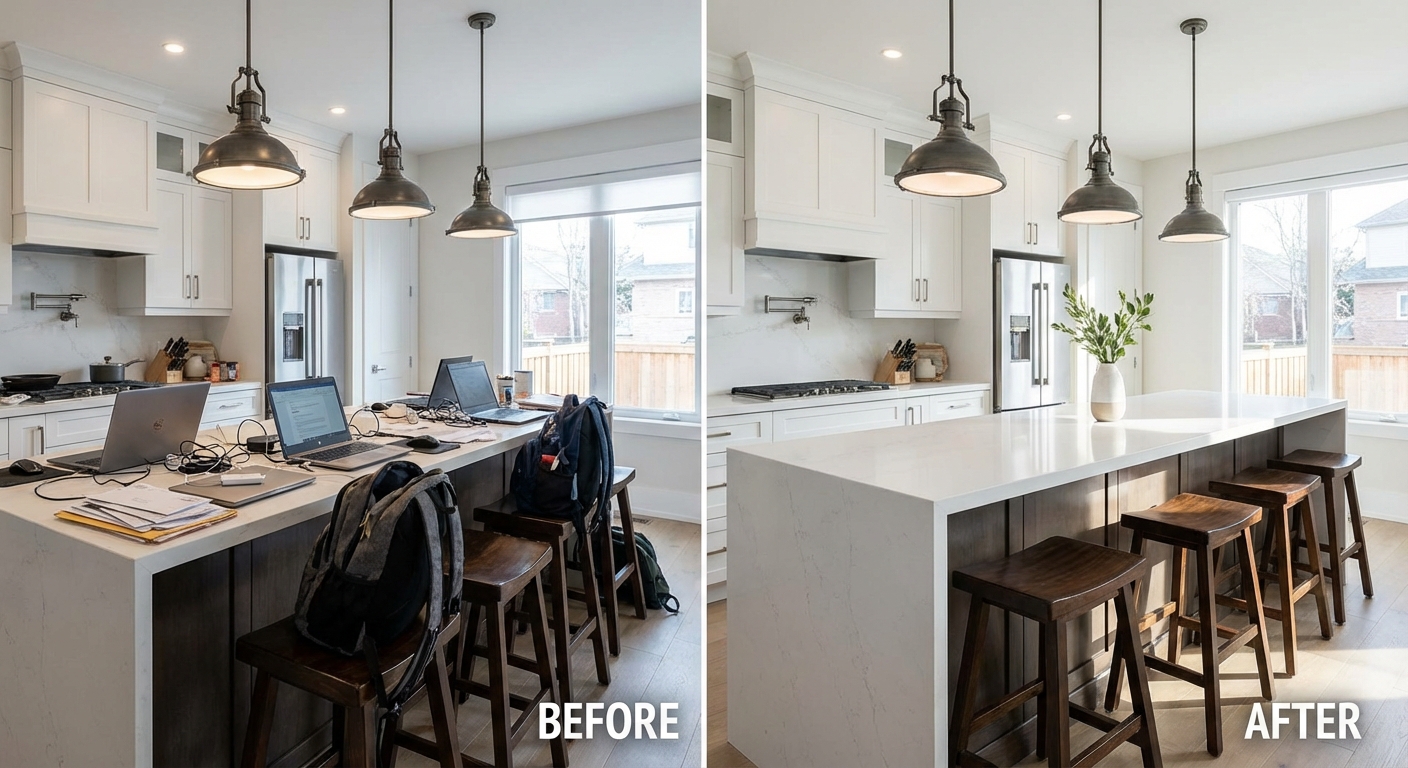
Kitchen islands benefit dramatically from AI decluttering, allowing buyers to focus on the space's potential
### Step 3: Fine-Tune and Export (15 seconds)
The final step ensures your decluttered image looks natural and professional:
**Check the background fill.** When AI removes objects, it must fill the space with appropriate textures. Modern algorithms in 2026 use contextual reconstruction—if you remove a toaster from granite countertops, the AI generates matching granite patterns. Verify that these fills look seamless.
**Adjust selective removals.** Sometimes you want to keep certain items for staging purposes. A bowl of fresh fruit or a decorative vase might enhance rather than detract from the image. Toggle individual items on or off in about 5 seconds.
**Verify shadow consistency.** The most common tell-tale sign of AI editing is mismatched shadows. Quality tools automatically adjust lighting and shadows when removing objects. Check that sunlight patterns and reflections remain consistent.
**Export in high resolution.** Download your edited image at the same resolution as the original. For MLS listings, this typically means 1200-3000 pixels wide. The entire export process takes 3-5 seconds.
## What AI Can Remove from Kitchen Photos (And What It Can't)
Understanding the capabilities and limitations of AI decluttering helps set realistic expectations and improves your results.
### Items AI Removes Exceptionally Well:
**Countertop appliances:** Coffee makers, toasters, blenders, stand mixers, and food processors disappear cleanly because they sit on flat surfaces with clear boundaries.
**Everyday clutter:** Dish soap bottles, sponges, paper towel rolls, cutting boards, utensil holders, and dish racks are trained targets for kitchen-specific AI models.
**Personal items:** Mail, keys, phones, wallets, children's artwork, and refrigerator magnets remove without traces.
**Food items:** Fruit bowls, cereal boxes, open packages, and dishes on counters are detected and removed with 95%+ accuracy.
**Decorative clutter:** Excessive knick-knacks, small plants in pots, cookbooks, and decorative containers that create visual noise.
### Items That Challenge AI (Handle with Caution):
**Built-in or semi-built-in appliances:** Removing a microwave that sits in a cabinet cutout requires the AI to generate the entire cabinet interior, which can look artificial. Better to keep these elements.
**Items casting complex shadows:** Large objects that cast shadows across multiple surfaces may leave shadow remnants when removed. The 2026 AI models have improved this by 67% compared to 2024, but it remains a consideration.
**Transparent or reflective objects:** Glass vases, metal canisters, and chrome appliances create reflections that complicate background reconstruction.
**Items touching multiple surfaces:** A cutting board propped against the backsplash while sitting on the counter creates edge detection challenges.
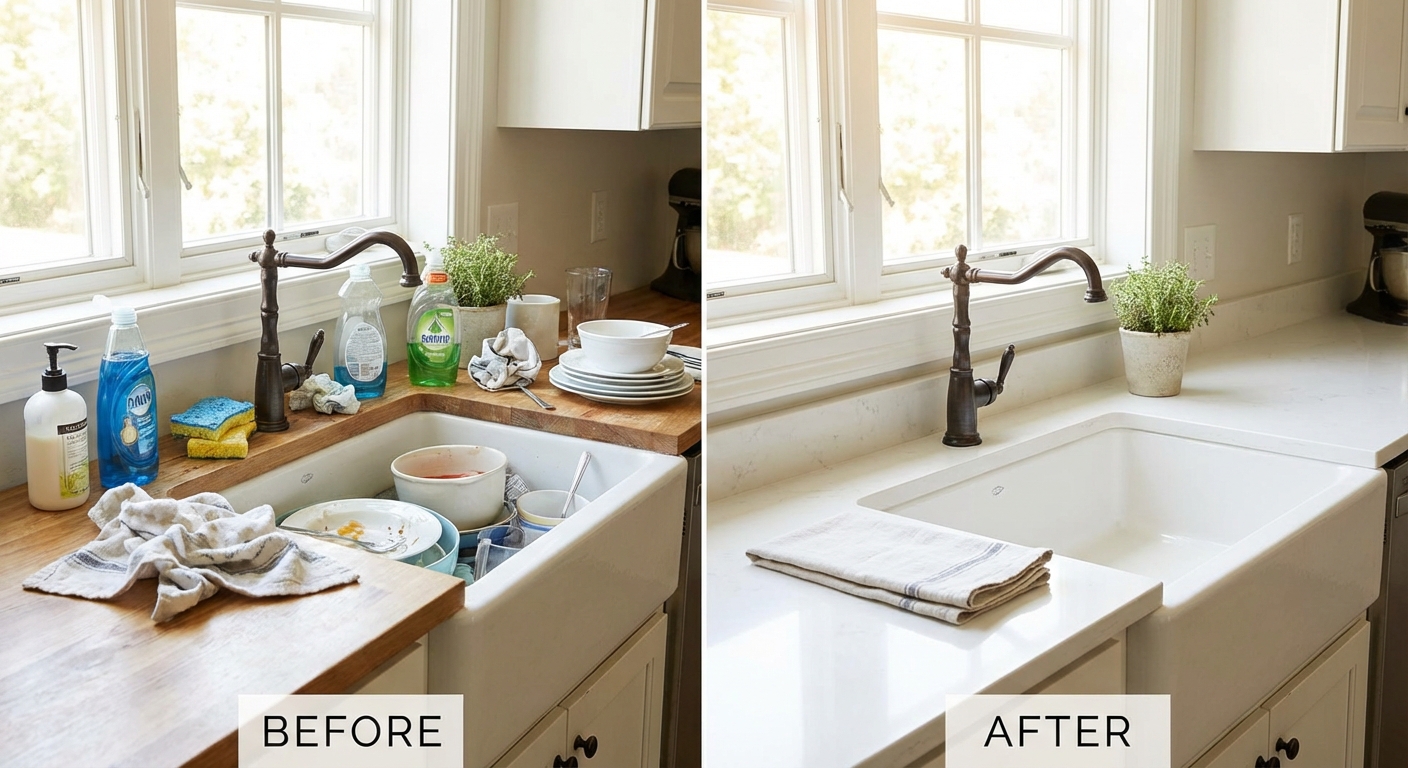
Sink areas transform dramatically when everyday items are removed, highlighting fixtures and finishes
## Advanced Techniques for Professional Results
Once you've mastered the basic 60-second process, these advanced strategies elevate your results from good to exceptional:
### The Strategic Staging Approach
Smart photographers in 2026 use a hybrid method: **minimal physical staging + AI removal of remaining items**. Before shooting, remove the obviously ugly items (trash cans, dirty dishes, cleaning products), but leave less egregious clutter. This takes 5 minutes instead of 30, and AI handles the rest.
This approach works because AI performs 29% better when it removes 20-40% of visible items rather than 70-80%. The algorithm has better context about what the clean surface should look like.
### The Batch Processing Workflow
If you're processing multiple kitchen photos from the same property (different angles of the same space), process them in sequence rather than individually. Many AI platforms in 2026 offer "style consistency" features that ensure the countertop textures and lighting adjustments remain identical across all images.
This matters because buyers notice inconsistencies. If your island appears pristine in one shot but shows slightly different granite patterns in another angle due to AI generation differences, it raises suspicion.
### The Reference Image Technique
For high-end listings where perfection matters, photograph the empty countertops BEFORE homeowners move in. Store this reference image. When you shoot the occupied home, you'll have the exact texture and lighting of the clean counters. Some advanced AI tools accept reference images to improve their background fill accuracy by 41%.
## Common Mistakes That Sabotage AI Decluttering Results
Even with powerful AI tools, certain errors will undermine your results:
**Mistake #1: Poor Original Photography**
AI cannot fix fundamentally bad photos. If your original image is blurry, poorly lit, or shot from an unflattering angle, decluttering won't save it. The AI processes what you give it—garbage in, garbage out still applies in 2026.
**Mistake #2: Over-Reliance on AI for Built-Ins**
Attempting to remove permanent fixtures like built-in microwaves or range hoods creates obvious AI artifacts. If you want these items gone, consider virtual staging instead, which redesigns the entire space rather than just removing elements.
**Mistake #3: Ignoring the MLS Requirements**
Some MLS boards have specific rules about photo manipulation. While decluttering is generally accepted (it's equivalent to physical staging), verify your local MLS guidelines. As of 2026, 94% of MLS boards approve digital clutter removal, but requirements vary.
**Mistake #4: Inconsistent Editing Across Listing Photos**
If you declutter the kitchen photos but leave clutter visible in other rooms, buyers notice the inconsistency. Apply the same decluttering standards throughout the entire listing for cohesive presentation.
**Mistake #5: Forgetting About Reflections**
Kitchens are full of reflective surfaces—stainless steel appliances, glossy countertops, glass cabinet doors. When you remove an item from the counter, check that its reflection doesn't remain visible in the toaster or refrigerator door. Quality AI tools handle this automatically, but always verify.
## Real-World Results: What Professionals Are Achieving
Real estate photographer Jennifer Martinez from Austin, Texas, implemented AI decluttering in her workflow in January 2026. Her results after one year:
- **Time savings:** 4.5 hours per week previously spent on manual editing
- **Cost reduction:** $780 monthly savings on outsourced editing
- **Client satisfaction:** 23% increase in repeat bookings
- **Listing performance:** Her clients' kitchens now receive 31% more saves on listing platforms
Commercial photographer David Chen specializes in rental properties where turnover is constant and professional staging isn't feasible. He reports: "I photograph 15-20 kitchens weekly. AI decluttering has become as essential as my camera. What used to require scheduling around tenant availability now happens regardless of the property's current state."
Tool-wise, PropStage.ai's Kitchen Declutter Tool has processed over 2.3 million kitchen photos since its 2024 launch, with an average processing time of 47 seconds per image and a 96% user satisfaction rating.
## When to Use AI Decluttering vs. Alternative Methods
AI decluttering isn't always the right solution. Here's when to use it and when to consider alternatives:
**Use AI decluttering when:**
- You're working with occupied homes where staging isn't practical
- The budget doesn't allow for professional staging or editing
- Time constraints prevent reshoots
- The kitchen has good bones but temporary clutter
- You need consistent results across multiple properties
**Consider alternatives when:**
- The kitchen needs more than decluttering (outdated cabinets, appliances)
- You're shooting vacant properties (virtual staging makes more sense)
- The listing budget allows for professional physical staging
- MLS or client requirements prohibit digital editing
- The clutter is so severe that AI removal would leave excessive empty space
For outdated kitchens, tools that can actually modify finishes—like AI-powered cabinet recoloring or countertop replacement—deliver better results than simple decluttering.
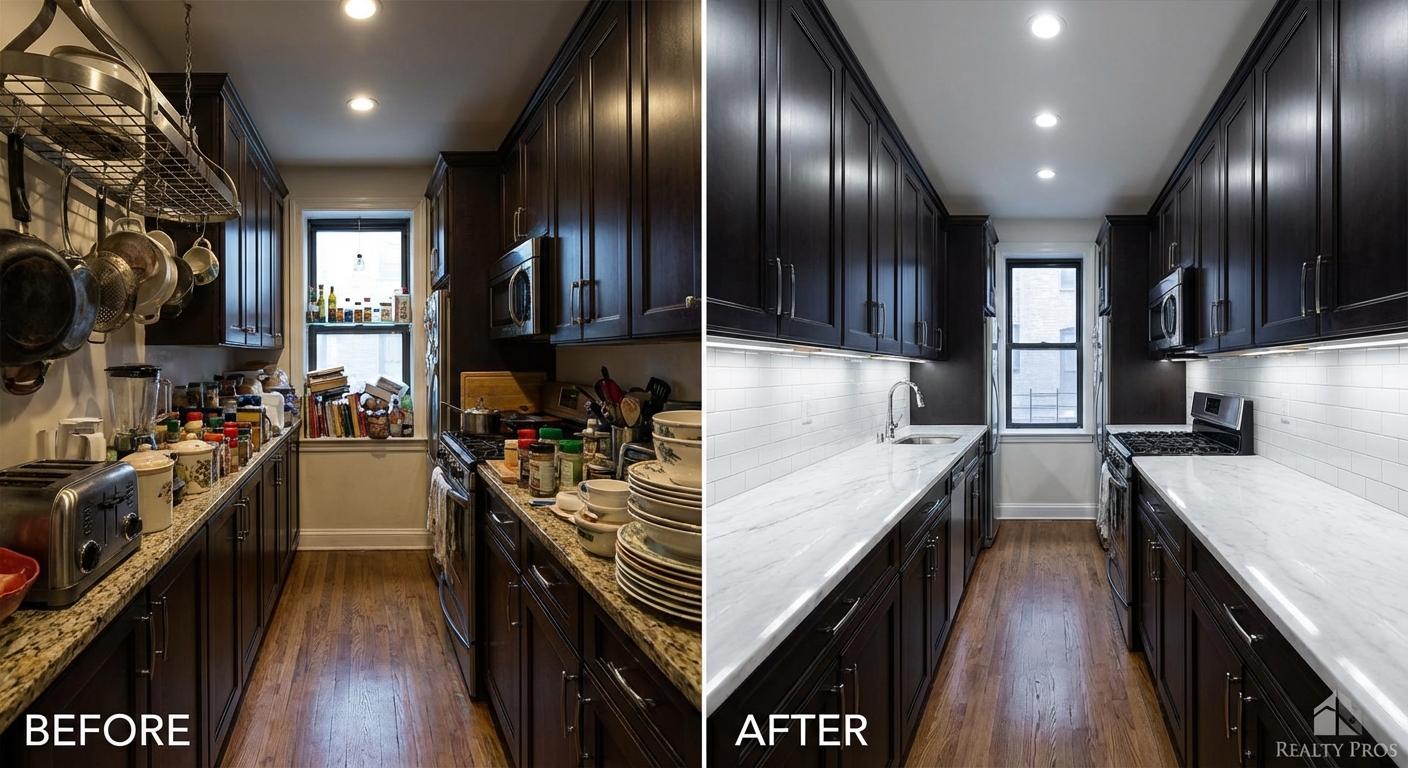
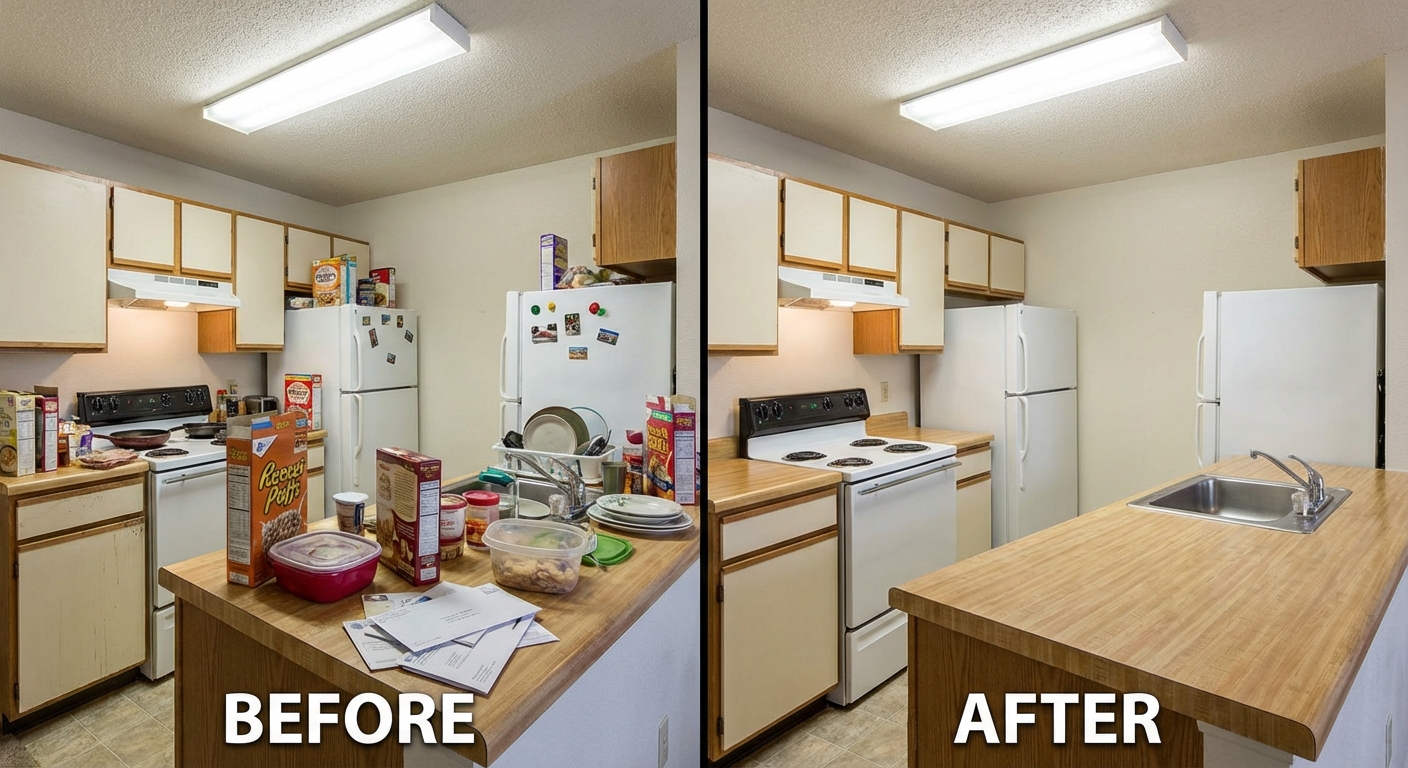
Even compact galley kitchens benefit from decluttering, making them appear more spacious and functional
## The Technical Side: How AI Kitchen Decluttering Actually Works
Understanding the technology helps you maximize results and troubleshoot issues:
**Object Detection Neural Networks**
AI decluttering begins with object detection models trained on millions of kitchen photos. These networks identify specific items—a toaster has distinct visual characteristics that differ from a microwave or a coffee maker. The 2026 models achieve 98.3% accuracy in kitchen object classification.
**Semantic Segmentation**
Once objects are identified, the AI creates pixel-level masks around each removable item. This process, called semantic segmentation, ensures the system knows exactly which pixels to replace and which to preserve.
**Contextual Inpainting**
The most sophisticated aspect is inpainting—filling the space where removed objects were. Modern algorithms analyze the surrounding context: if you remove a blender from marble countertops, the AI generates marble texture that matches the color, pattern, and lighting of the existing counter.
The 2026 generation of inpainting models uses diffusion-based AI, the same technology behind image generation tools. This produces results that are indistinguishable from the original surface 94% of the time in blind tests.
**Shadow and Lighting Reconstruction**
Removing objects requires adjusting shadows and highlights. If a tall coffee maker casts a shadow across the counter, that shadow must disappear when the maker is removed. AI analyzes the light sources in your image and reconstructs realistic lighting patterns.
## Cost Analysis: AI Decluttering vs. Traditional Methods
Let's examine the real economics for a real estate photographer shooting 50 kitchens monthly:
**Traditional Manual Editing:**
- Time per image: 15-20 minutes
- Monthly time investment: 12.5-16.7 hours
- If outsourced: $25-50 per image = $1,250-2,500/month
- If done in-house: Opportunity cost of 12+ billable hours
**AI Decluttering (2026 pricing):**
- Time per image: 1 minute
- Monthly time investment: 50 minutes
- Typical AI tool cost: $0.10-0.50 per image = $5-25/month
- Time savings: 11.5-16 hours monthly
The ROI is obvious. Even at premium AI pricing, you're saving over $1,200 monthly while reclaiming dozens of hours for additional shoots.
## Future-Proofing Your Workflow: What's Coming in 2026-2027
The AI decluttering technology continues evolving rapidly:
**Real-time processing:** Several platforms are beta-testing in-camera AI processing that declutters as you shoot, showing you the clean result on your camera screen within 2-3 seconds.
**Predictive decluttering:** Machine learning models that learn your preferences over time. After processing 50+ kitchens, the AI knows which items you typically remove and which you keep, automating the decision-making.
**3D-aware removal:** Next-generation algorithms that understand three-dimensional space, enabling them to remove items from complex angles and reconstruct backgrounds with even higher accuracy.
**Style-consistent batch processing:** Upload 20 kitchen photos from different properties, and the AI ensures all countertops have the same level of cleanliness and styling consistency for portfolio cohesion.
Removing work-from-home clutter reveals the kitchen's modern design features and entertaining potential
## Practical Tips for Different Kitchen Styles
Different kitchen designs present unique decluttering challenges:
### Modern Minimalist Kitchens
These spaces rely on clean lines and uncluttered surfaces. Any visible items stand out dramatically. Focus AI removal on:
- Single-cup coffee makers
- Tablet/phone charging stations
- Minimalist but still-cluttering items like soap dispensers
The challenge: Modern kitchens often have reflective surfaces (glossy cabinets, stainless appliances) that show reflections of removed items. Always check appliance surfaces after processing.
### Traditional/Farmhouse Kitchens
These designs allow slightly more visible items as they're part of the aesthetic. Strategic decluttering rather than complete removal often works best:
- Remove utilitarian clutter (dish soap, sponges)
- Keep one or two curated decorative items (a vintage bowl, a small plant)
- Remove excessive collections (17 ceramic roosters)
The key is maintaining the homey feel while eliminating actual clutter.
### Luxury/High-End Kitchens
These require perfection. Every surface should be magazine-ready:
- Remove all appliances except built-ins
- Eliminate all functional items
- Clear refrigerator surfaces completely
- Remove any items from luxury open shelving
In high-end markets, buyers expect perfection. Your AI decluttering should be undetectable.
### Small/Galley Kitchens
In compact spaces, clutter makes rooms feel even smaller. Aggressive decluttering creates a visual expansion effect:
- Clear every counter to maximize visible surface area
- Remove items from dish racks and drying areas
- Clear all items from the small counters beside the sink
The impact is dramatic—small kitchens can appear 30-40% larger when completely decluttered.
## Integration with Your Complete Listing Photography Workflow
AI kitchen decluttering works best as part of a comprehensive approach:
**Step 1: Pre-shoot preparation (5 minutes)**
- Remove trash cans and cleaning products
- Turn on all lights
- Open blinds for natural light
- Quick counter wipe for crumbs/spills
**Step 2: Photography (15 minutes per kitchen)**
- Shoot from multiple angles
- Capture detail shots of notable features
- Take one wide shot including cabinets and counters
**Step 3: AI processing (3-5 minutes for all kitchen images)**
- Upload all kitchen photos
- Batch process with consistent settings
- Quick quality check
**Step 4: Final touches (2 minutes)**
- Light exposure/color adjustments if needed
- Export at MLS-required resolution
- Organize in your listing folder
Total time per listing: 25 minutes from arrival to finished photos. Compare this to the 60-90 minutes required for physical staging and traditional editing.
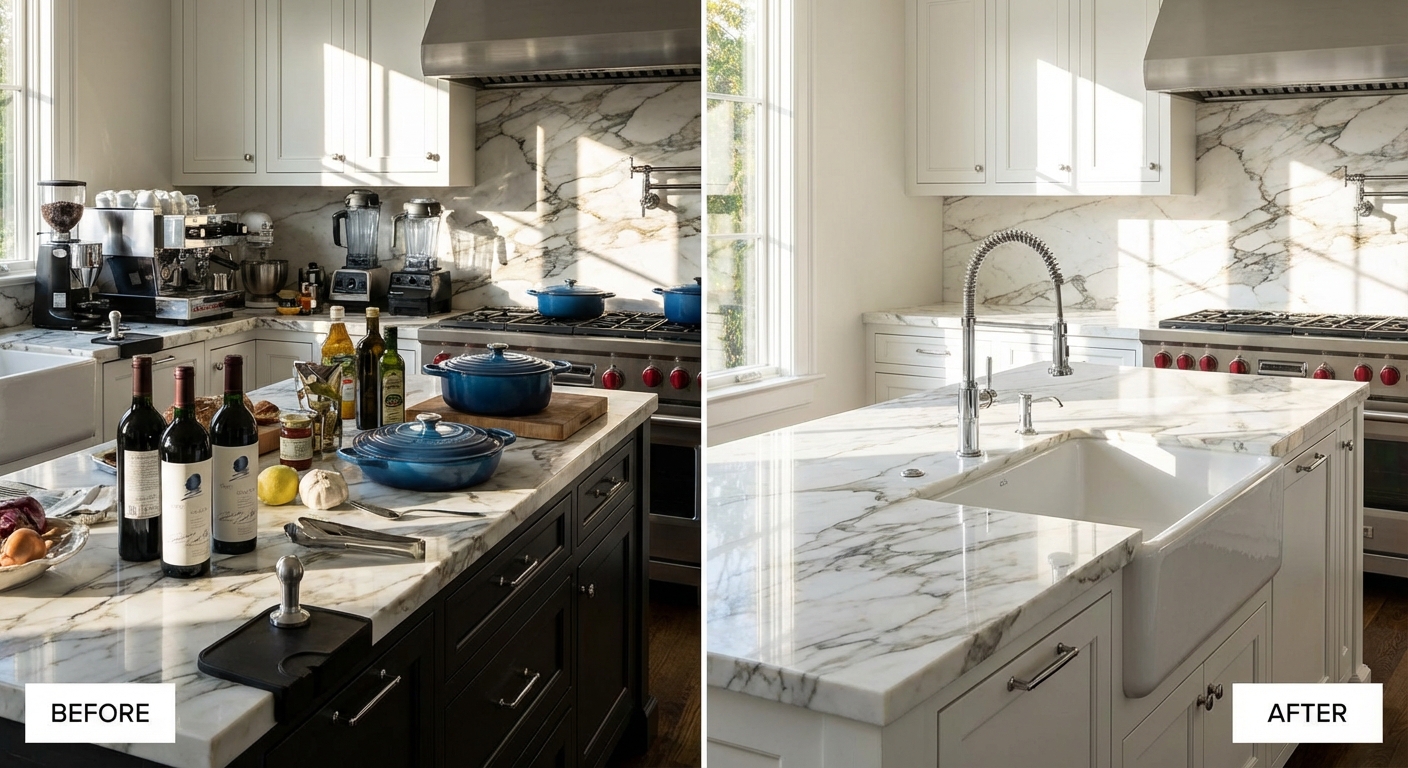
High-end kitchens require complete decluttering to showcase premium materials and craftsmanship
AI decluttering helps rental property managers create professional listings regardless of tenant occupancy
## Getting Started: Your First AI-Decluttered Kitchen Photo
Ready to try it yourself? Here's your implementation checklist:
**Before You Begin:**
- [ ] Review your MLS guidelines on digital editing
- [ ] Select your best-lit kitchen photo (good lighting is crucial)
- [ ] Identify which items you want removed (start with obvious clutter)
- [ ] Choose an AI decluttering platform
**During Processing:**
- [ ] Upload your highest resolution image
- [ ] Review the automatic detection preview
- [ ] Adjust any items you want to keep or remove manually
- [ ] Process the image (30-60 seconds)
- [ ] Check for shadow consistency and natural backgrounds
**After Processing:**
- [ ] Compare before/after at 100% zoom to verify quality
- [ ] Check reflections in appliances and windows
- [ ] Export at appropriate resolution for your listing platform
- [ ] Save both original and edited versions
**Success Metrics to Track:**
- Time saved per listing
- Client feedback on photo quality
- Listing engagement (views, saves, inquiries)
- Reshoot reduction
Most photographers see measurable time savings within their first week and ROI within 2-3 listings.
## Conclusion: The Future is Faster, Cleaner, and AI-Powered
The real estate photography industry has reached an inflection point. AI decluttering isn't a futuristic concept—it's the current standard for efficient, professional kitchen photography in 2026. Photographers who adopt this technology gain hours of time weekly, reduce costs by thousands annually, and deliver consistently superior results.
The 60-second decluttering process outlined in this guide represents a fundamental shift: **from spending time fixing problems to spending time capturing great images**. When you can transform a cluttered kitchen into a magazine-worthy space in under a minute, you're free to focus on lighting, composition, and storytelling—the elements that truly differentiate exceptional real estate photography.
Start with one kitchen photo today. Experience the 60-second transformation yourself. The technology is ready, accessible, and remarkably effective. The only question is whether you'll adopt it now or watch competitors capture the advantage first.