
Outil de remplacement de tapis
- Photo
- Vos choix
- Votre image
Voyez ce qui est possible
Résultats réels à partir de photos comme la vôtre.



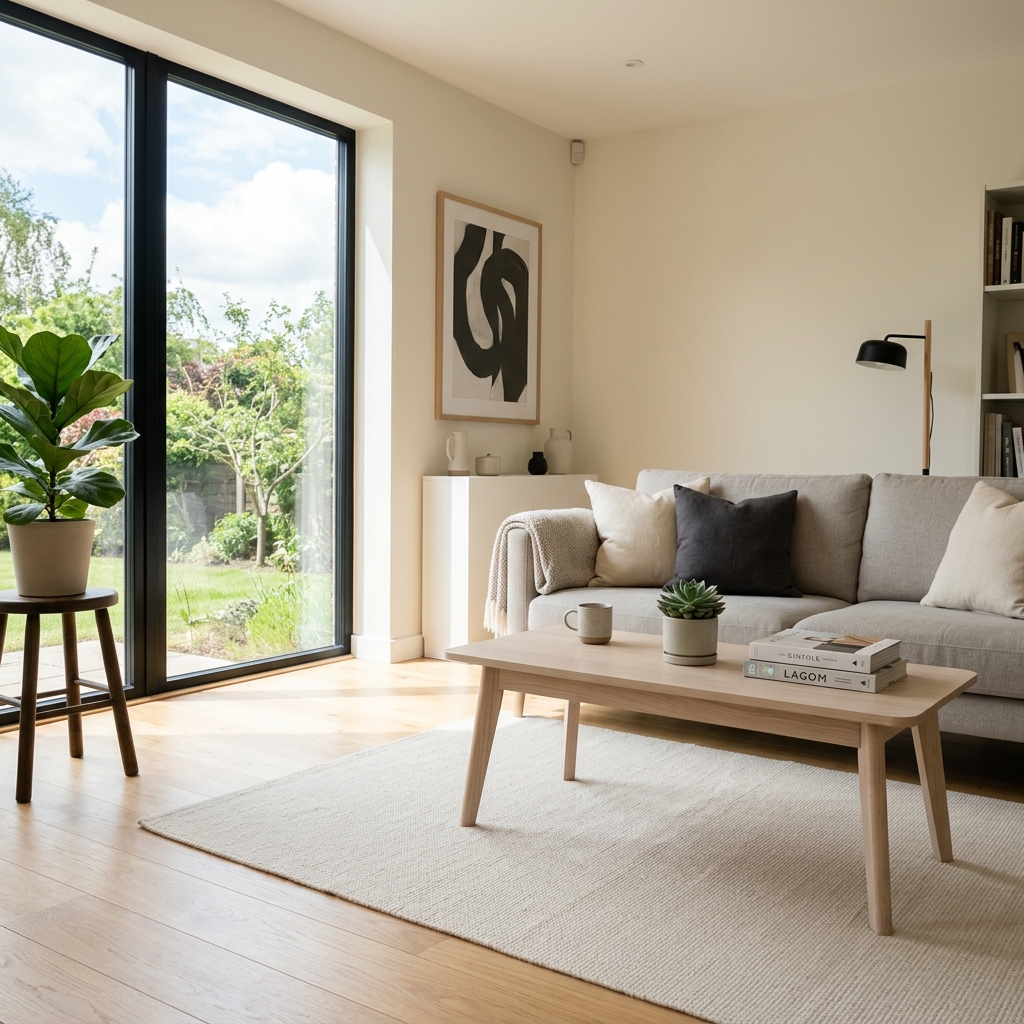


Comment ça fonctionne
- 1Téléchargez votre photo
- 2Choisissez vos paramètres
- 3Votre image
Conseils pour un bon résultat
Photo nette et lumineuse
La lumière du jour et un grand angle donnent le meilleur résultat.
Montrez toute la zone
Gardez entièrement dans l’image tout ce que vous souhaitez modifier.
Essayez plusieurs variantes
Comparez différentes options avant de décider.
Foire aux questions
Puis-je utiliser les images à des fins commerciales ?
Oui. Vous pouvez utiliser vos images à toute fin, y compris à des fins commerciales.
Mon photo originale change-t-elle ?
Non. Votre photo originale reste inchangée et vous pouvez la télécharger à tout moment.
Et si le résultat ne me plaît pas ?
Essayez un autre style ou un autre paramètre, ou affinez le résultat avec une courte instruction.
Continuer à explorer
Tous les outils
Amélioration du paysagement aérien
Transformez des terrains négligés, nus ou peu attrayants sur les photos immobilières prises par drone ou depuis les airs. Ajoutez des pelouses luxuriantes, des piscines, des jardins formels, des massifs de plantation et des allées impeccables — le tout visible d’en haut. Montrez aux acheteurs tout le potentiel de l’espace extérieur sans faire appel à un paysagiste.

Échange de bordure de coussin IA
Transformez instantanément les bordures, garnitures et passepoils des coussins décoratifs dans vos photos immobilières. Cet outil d’IA permet aux designers et aux home stagers de visualiser différents styles, couleurs et matériaux, en améliorant l’esthétique intérieure sans changements physiques.

Échange de franges et de passepoils de coussin IA
Visualisez sans effort de nouveaux styles de franges et de bordures décoratives pour coussins sur vos photos d’intérieur. Cet outil d’IA permet aux designers et aux home stagers de remplacer les détails de coussins existants, en montrant instantanément une esthétique mise à jour sans changements physiques.
Lire le guide complet
How long does generation take for Rug Replacement Tool?
Generation usually takes between 5 and 15 seconds.
Can I use the results commercially?
Yes, every generated image includes a full commercial usage license.
Tips for your photo
Make sure the photo is well lit and shot from a wide angle.
Remove clutter before shooting the photo for the best results.
Use re-staging mode for targeted style changes.
Frequently asked questions
What input image formats and resolutions does the Rug Replacement Tool recommend for seamless rug swaps in real estate photos?
Upload high-resolution JPG or PNG images (2000-4000 pixels on the longest side) for the Rug Replacement Tool. This ensures crisp detail and realistic texture integration, crucial for professional "real estate photos" on "MLS" or "Zillow" listings.
How quickly does the Rug Replacement Tool process a rug replacement, especially for multiple property listing images?
The Rug Replacement Tool typically processes a rug swap in under 30 seconds. Larger or more complex "real estate photos" might take slightly longer, but our AI prioritizes speed to help agents quickly update "property listing" visuals.
What output quality can an agent expect from the Rug Replacement Tool, and how does it enhance property listings?
Expect photorealistic output from the Rug Replacement Tool, seamlessly integrating new rugs with existing lighting and shadows. This "Enhance"s "property listing" appeal, making "MLS" and "Zillow" photos more attractive to potential buyers.
What are the top 3 tips for using the Rug Replacement Tool to achieve the most convincing rug swaps in property listing photos?
For optimal results with the Rug Replacement Tool, ensure the original photo has good lighting and a clear floor area. "Stage" the room virtually by selecting rugs with appropriate scale and texture to match the "real estate photos" style.
Can I adjust or re-generate a rug replacement if the initial result from the Rug Replacement Tool isn't perfect for my property listing?
Absolutely. The Rug Replacement Tool allows for easy re-selection and re-generation. If the first swap isn't ideal, simply choose a different rug or "Enhance" the existing one until it perfectly complements your "real estate photos" for any "agent" use.
Technical FAQ: Rug Replacement Tool
Quick answers for optimal results
Common mistakes
5 Critical Rug Replacement Tool Mistakes Sabotaging Your Real Estate Photos
How to avoid common pitfalls when using a rug replacement tool online for your property listing
Ignoring Rug Alignment in the Rug Replacement Tool
Misaligned rugs look unnatural and detract from the overall appeal of your real estate photos, hurting your MLS listing.
Carefully adjust the rug's position and angle within the Rug Replacement Tool to match the room's perspective for realistic real estate photos.
Using Low-Resolution Rug Images with the Rug Replacement Tool
Pixelated or blurry rugs will make your property listing look unprofessional, even with a sophisticated rug replacement tool.
Upload high-resolution rug images to the Rug Replacement Tool to ensure a crisp and visually appealing final result for your Zillow listing.
Overlooking Rug Size and Proportion with the Rug Replacement Tool
A rug that's too small or too large will throw off the room's balance and make your real estate photos look awkward to potential buyers.
Use the Rug Replacement Tool to experiment with different rug sizes and proportions to find the perfect fit for the space in your property listing.
Neglecting Rug Style Compatibility Using the Rug Replacement Tool
A modern rug in a traditional room (or vice versa) will clash and negatively impact the perceived value of your property listing.
Select rug styles within the Rug Replacement Tool that complement the existing decor and architectural style of the room for a cohesive look.
Failing to Adjust Rug Color and Lighting in the Rug Replacement Tool
A rug's color that doesn't match the room's lighting or overall color scheme will look out of place and unrealistic in your real estate photos.
Use the Rug Replacement Tool's color adjustment features to fine-tune the rug's hue, saturation, and brightness to seamlessly integrate with the existing lighting conditions.
Rug Replacement Tool: See the Stunning Results You Can Achieve
Upload Your Real Estate Photos & Visualize New Rugs Instantly
Your workflow
4 Steps to Flawless Listings: Mastering the Rug Replacement Tool
How to use a rug replacement tool online for stunning real estate photos
Upload Your Real Estate Photo
Upload your original property listing photo to the Rug Replacement Tool. Ensure the photo is high-resolution for optimal results. This will ensure the replaced rug blends seamlessly into the real estate photos.
Use photos with good lighting and minimal obstructions for the best rug replacement results. This is crucial for attracting potential buyers on Zillow and other platforms.
Select Your Dream Rug
Browse our extensive library of rug styles within the Rug Replacement Tool. Choose a rug that complements the room's decor and enhances the overall appeal for your property listing. Consider the target demographic when selecting a rug for your real estate photos.
Experiment with different rug styles to see what resonates best with your target buyer. The Rug Replacement Tool allows for quick and easy iterations.
Seamless Rug Replacement
Utilize the Rug Replacement Tool's intuitive interface to seamlessly integrate the new rug into your real estate photos. Adjust the size, perspective, and positioning for a realistic and professional finish. Ensure the rug aligns perfectly with the existing furniture and room layout.
Pay close attention to shadows and lighting to ensure the replaced rug looks natural and believable in the real estate photos. Use the tool's adjustment features to fine-tune the integration.
Download and Publish to MLS & Zillow
Download your enhanced real estate photos with the replaced rug. Instantly upload them to your MLS listing, Zillow, and other platforms to attract more potential buyers and boost your property's appeal. Show off your stunning new real estate photos to potential buyers.
Use consistent branding across all your real estate photos, including the rug style, to create a cohesive and professional image. Track the performance of your listings with the replaced rugs to measure the impact of the Rug Replacement Tool.
Use cases
Property Listings for Rug Replacement Tool
Social Media Marketing & Instagram Inserate
Architektur- & Umbau-Präsentationen
Rug Replacement Tool: Technical Specifications for Stunning Real Estate Photos
Swap Any Rug in Seconds—No Photoshop Required to Enhance Your Property Listing on Zillow and MLS
1. Upload your property photo.
2. Choose the interior style or room type you want.
3. Click Generate and get your result in seconds.
Expert guide
5 Pro Tips: Transform Real Estate Photos with the Rug Replacement Tool
How to Get the Best Results with Your Online Rug Replacement Tool
Prepare High-Quality Real Estate Photos for Optimal Rug Swaps
Upload clear, well-lit real estate photos to the Rug Replacement Tool. Ensure your property listing images are high-resolution for seamless rug integration. Avoid blurry or distorted images to maximize the tool's effectiveness for Zillow and MLS listings. Use professional real estate photos for the best results.
Adjust Rug Replacement Tool Settings for Realistic Integration
Fine-tune the Rug Replacement Tool's settings to match the lighting and perspective of your real estate photos. Experiment with shadow and reflection adjustments to ensure the new rug blends seamlessly with the existing environment. Proper setting adjustments enhance your property listing's appeal to potential buyers.
Achieve the Best Rug Replacement Results: Focus on Detail
Pay close attention to the rug's edges and corners when using the Rug Replacement Tool. Ensure the rug aligns perfectly with the floor and any existing furniture. Minor adjustments can significantly enhance the realism of your staged property listing, making it more attractive on Zillow and other platforms.
Use the Rug Replacement Tool for Professional Property Listing Enhancement
Leverage the Rug Replacement Tool to quickly update and refresh your property listing's appearance. Showcase different rug styles to appeal to a broader range of potential buyers. As an agent, use this tool to enhance your MLS listings and attract more attention to your real estate photos.
How it works
3 Pro Steps to Master the Rug Replacement Tool
How to use the rug replacement tool online for professional real estate photos in 2025
Upload Your High-Resolution Property Photos
Upload your interior property photos directly to the Rug Replacement Tool to begin the transformation process for your Zillow or MLS listing, ensuring every room looks professionally staged for potential home buyers.
Select Your Preferred Virtual Staging Style
Choose from our curated library of designer textures to instantly swap outdated carpets, allowing real estate agents to customize the home staging aesthetic to match current market trends and buyer preferences effortlessly.
Download High-Res Staged Listing Images
Generate and download your enhanced property listing images in high resolution, providing a cost-effective virtual staging solution that answers how to improve visual appeal without expensive physical rug rentals or heavy lifting.
What you can do
Advanced Rug Replacement Tool Capabilities
Photorealistic Rug Replacement Quality
Enhance every property listing with the Rug Replacement Tool, delivering stunning, high-resolution real estate photos that captivate on MLS and Zillow, ensuring professional presentation.
Lightning-Fast Rug Swap Processing
Transform interiors instantly with the Rug Replacement Tool; upload images and convert old rugs to new in seconds, drastically speeding up an agent's workflow for multiple property listings.
Flexible Image Export Formats
The Rug Replacement Tool supports diverse output formats, allowing agents to seamlessly upload enhanced real estate photos to any property listing platform or marketing material, including MLS.
Extensive Rug Style Library
Stage any room perfectly; the Rug Replacement Tool offers a vast selection of rug styles and textures, enabling agents to customize and enhance property listings to suit any aesthetic.
AI-Powered Seamless Integration
Leverage the Rug Replacement Tool's advanced AI to ensure precise edge detection and natural blending for every rug swap, making real estate photos look professionally staged without effort.
Optimized for Agent Workflows
The Rug Replacement Tool streamlines the entire process, empowering agents to efficiently enhance property listings and create compelling real estate photos for Zillow and other platforms.
Pro-level tools at your fingertips