
Verktyg för golvbyte
- Foto
- Dina val
- Din bild
Se vad som är möjligt
Riktiga resultat från foton som dina.



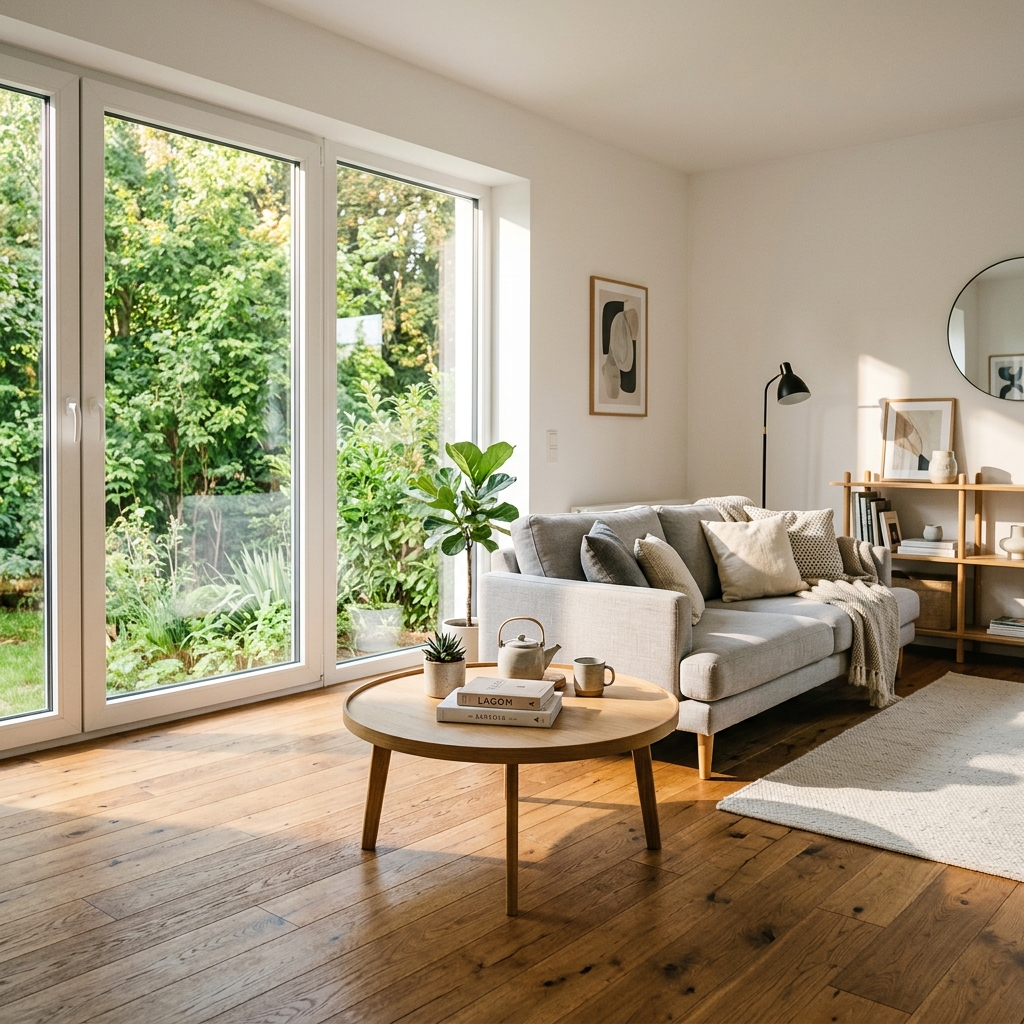

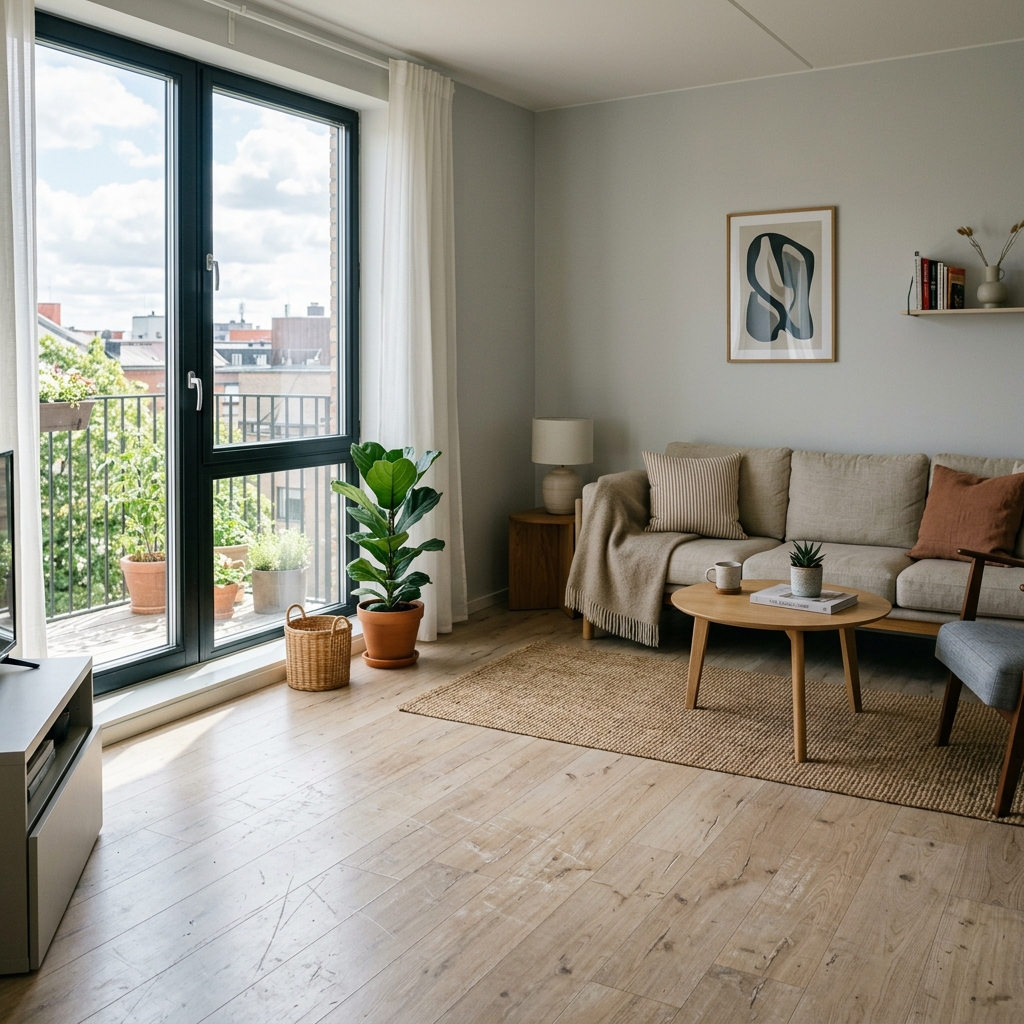
Så fungerar det
- 1Ladda upp ditt foto
- 2Välj dina inställningar
- 3Din bild
Tips för ett bra resultat
Ljusstark, tydlig bild
Dagsljus och en vidvinkel ger bäst resultat.
Visa hela ytan
Se till att allt du vill ändra syns tydligt i bilden.
Testa flera varianter
Jämför olika alternativ innan du bestämmer dig.
Vanliga frågor
Får jag använda bilderna kommersiellt?
Ja. Du kan använda dina bilder för vilket syfte som helst, inklusive kommersiell användning.
Ändras min originalbild?
Nej. Din originalbild förblir oförändrad och du kan ladda ner den när som helst.
Vad händer om jag inte gillar resultatet?
Testa en annan stil eller inställning, eller finjustera resultatet med en kort instruktion.
Fortsätt utforska
Alla verktyg
Förbättring av landskap från luften
Förvandla försummade, kala eller oinspirerande tomter i drönar- och flygfoton av fastigheter. Lägg till frodiga gräsmattor, pooler, formella trädgårdar, planteringsrabatter och fläckfria uppfarter — allt synligt uppifrån. Visa köpare hela potentialen i utomhusytan utan en enda landskapsarkitekt.

AI-byte av kuddkant
Förvandla direkt kanter, kantband och passpoal på dekorativa kuddar i dina bostadsbilder. Det här AI-verktyget låter designers och stagers visualisera olika stilar, färger och material och förbättra inredningens estetik utan fysiska ändringar.

AI-byte av tofsar och kantband på kuddar
Visualisera enkelt nya dekorativa frans- och kantbandsstilar för prydnadskuddar i dina inredningsbilder. Det här AI-verktyget låter designers och stagers byta ut befintliga kudddetaljer och direkt visa upp uppdaterad estetik utan fysiska ändringar.
Läs hela guiden
How long does generation take for Flooring Swap Tool?
Generation usually takes between 5 and 15 seconds.
Can I use the results commercially?
Yes, every generated image includes a full commercial usage license.
Tips for your photo
Make sure the photo is well lit and shot from a wide angle.
Remove clutter before shooting the photo for the best results.
Use re-staging mode for targeted style changes.
Frequently asked questions
Upload optimal real estate photos: What are the recommended input image formats and resolutions for the Flooring Swap Tool?
Upload high-resolution JPEG or PNG real estate photos (1920x1080px minimum) to ensure the Flooring Swap Tool accurately detects and replaces flooring. This optimizes property listing visuals for agents.
Convert images quickly: How long does the Flooring Swap Tool typically take to process an image?
Convert your property listing photos in seconds. The Flooring Swap Tool processes most images within 5-10 seconds, delivering instant floor replacements for your MLS or Zillow listings.
Enhance output quality: What is the output resolution and quality of images generated by the Flooring Swap Tool?
Enhance your property listing with high-quality output. The Flooring Swap Tool generates images at the original input resolution, ensuring professional-grade finishes perfect for any agent's portfolio.
Stage for success: What are 3 key tips for achieving the best results with the Flooring Swap Tool?
Stage your property effectively. First, ensure clear, well-lit real estate photos. Second, select flooring options that complement the room's aesthetics. Third, avoid cluttered floors for optimal detection by the Flooring Swap Tool.
Transform your flooring swap: Can I re-generate or modify a result with the Flooring Swap Tool?
Transform your property listing with ease. Yes, the Flooring Swap Tool allows unlimited re-generations. Simply choose a different flooring option or adjust settings to achieve the perfect look for your agent's property.
5 Technical FAQs: Master Your Flooring Swap Tool
How to use the Flooring Swap Tool online for optimal real estate photos
Common mistakes
5 Flooring Swap Tool Mistakes Killing Your Real Estate Photos
How to Avoid Common Errors and Maximize Your Property Listing Appeal
Using Low-Resolution Images with the Flooring Swap Tool
Blurry or pixelated source images result in unrealistic and unprofessional flooring swaps, deterring potential buyers viewing your MLS listing.
Upload high-resolution real estate photos to the Flooring Swap Tool. Ensure images are well-lit and in focus for optimal results.
Ignoring the Existing Room Style When Using the Flooring Swap Tool
Choosing flooring that clashes with the room's existing decor (e.g., modern flooring in a traditional room) creates a jarring and unappealing visual for Zillow viewers.
Select flooring options within the Flooring Swap Tool that complement the existing room style and color palette. Consider neutral options for broad appeal.
Overusing the Flooring Swap Tool on Every Room in the Property Listing
Swapping the flooring in every single room can appear artificial and overwhelming, making potential buyers question the authenticity of the property listing.
Strategically use the Flooring Swap Tool on key rooms like the living room or kitchen to showcase potential. Leave other rooms untouched to maintain a sense of realism.
Failing to Adjust Lighting and Shadows After a Flooring Swap
Inconsistencies in lighting and shadows between the original image and the swapped flooring make the alteration obvious and unprofessional, hurting your agent's credibility.
Use the Flooring Swap Tool's editing features (if available) or external photo editing software to adjust lighting and shadows to seamlessly blend the new flooring with the existing image.
Not Previewing the Flooring Swap on Different Devices
The flooring swap may look different on various screens (desktop, mobile), potentially distorting colors or creating unwanted artifacts for viewers on Zillow or other platforms.
Preview the final image on multiple devices to ensure consistent visual quality and make necessary adjustments within the Flooring Swap Tool before publishing the property listing.
Unveiling the Power of PropStage.ai's Flooring Swap Tool: See the Results!
Transform your real estate photos: Discover how our Flooring Swap Tool elevates property listings on Zillow and MLS.
Your workflow
4 Steps to Transform Real Estate Photos with the Flooring Swap Tool
How to Flooring Swap Tool Online: A Quick Guide for Agents
Upload Your Property Listing Photo
Upload high-quality real estate photos of your property to the Flooring Swap Tool. Ensure the floor is clearly visible for optimal results.
Use photos with good lighting and minimal obstructions on the floor for the best flooring swap.
Select Your Desired Flooring
Choose from a variety of premium flooring options within the Flooring Swap Tool. Preview different styles to match your property's aesthetic and target market.
Consider popular flooring trends and styles that appeal to potential buyers on Zillow and other platforms.
Instantly Swap the Flooring
With a single click, the Flooring Swap Tool will seamlessly replace the existing floor with your chosen option. Fine-tune the adjustments for a realistic and professional finish.
Adjust the lighting and perspective within the tool to ensure the swapped flooring blends perfectly with the real estate photos.
Download and Publish to MLS & Zillow
Download the enhanced real estate photos with the new flooring. Update your property listing on MLS, Zillow, and other platforms to attract more potential buyers.
Use the enhanced photos in your marketing materials to showcase the property's potential and increase its appeal to buyers and get more offers.
Use cases
Property Listings for Flooring Swap Tool
Social Media Marketing & Instagram Inserate
Architektur- & Umbau-Präsentationen
Flooring Swap Tool: Technical Specifications
1. Upload your property photo.
2. Choose the interior style or room type you want.
3. Click Generate and get your result in seconds.
Expert guide
5 Expert Tips: Dominate Real Estate Photos with a Flooring Swap Tool
How to Maximize Your Flooring Swap Tool Online for Stunning Property Listings
Prepare High-Resolution Real Estate Photos for Optimal Flooring Swaps
Transform your property listing with crisp, clear images. Ensure your real estate photos are well-lit and sharply focused before uploading to the Flooring Swap Tool. This guarantees a seamless and realistic flooring replacement, enhancing your MLS and Zillow appeal. Use high-resolution images for best results.
Fine-Tune Flooring Swap Tool Settings for Realistic Results
Convert ordinary rooms into extraordinary spaces by mastering the Flooring Swap Tool's settings. Adjust the lighting, perspective, and texture to match the existing room conditions. Experiment with different settings to achieve a natural and believable flooring replacement that impresses potential buyers and elevates your property listing.
Enhance Property Listings: Achieve the Best Results with Targeted Flooring Swaps
Stage your property listing for success by strategically using the Flooring Swap Tool. Select flooring options that complement the room's style and color palette. Focus on creating a cohesive and visually appealing look that attracts attention and increases the perceived value of the property on Zillow and other platforms. This is key for agents.
Utilize the Flooring Swap Tool for Professional Real Estate Marketing
Transform your real estate marketing materials with professionally swapped floors. Use the Flooring Swap Tool to create before-and-after visuals for brochures, online ads, and social media. Showcase the potential of each property with stunning flooring upgrades that captivate potential buyers and help you close more deals. Boost your agent profile with ease.
How it works
3 Steps to Master the Flooring Swap Tool
How to flooring swap tool online for free in 2026
Upload Your Real Estate Photos
Upload your property listing photos to the Flooring Swap Tool dashboard to begin the transformation. Our AI detects existing carpets or tiles to ensure a seamless digital floor replacement for Zillow.
Select Premium Virtual Staging Finishes
Choose from hardwood, marble, or luxury vinyl options within the Flooring Swap Tool interface. Enhance your interior design by matching the flooring to the home staging aesthetic preferred by modern brokers.
Download High-Res MLS Ready Images
Convert your outdated rooms into high-converting assets and download the final high-resolution files. These professional images are ready for immediate upload to the MLS, helping agents sell properties faster than ever.
What you can do
Advanced Flooring Swap Tool Capabilities
Photorealistic Output Quality
Generate stunning, high-resolution floor replacements, ensuring every real estate photo showcases premium finishes with unparalleled clarity for your property listing.
Instant Floor Transformation
Swiftly replace existing floors in seconds using the Flooring Swap Tool, dramatically cutting down editing time for real estate photos and accelerating agent workflows.
Versatile Export Formats
Download your enhanced property listing images in multiple high-quality formats, perfect for seamless integration into MLS, Zillow, and various agent marketing platforms.
Extensive Flooring Library
Choose from a vast selection of premium flooring materials—hardwood, tile, carpet—to perfectly match any property's aesthetic and attract specific buyers for your listing.
AI-Powered Edge Detection
Experience seamless, precise floor replacement with advanced AI algorithms that accurately detect edges, ensuring a natural, professional look in every real estate photo.
Elevate Property Listings
Empower agents to instantly upgrade property listings with modern, appealing floors using the Flooring Swap Tool, boosting perceived value and buyer interest.
Pro-level tools at your fingertips