
毛坯房转精装效果图生成器
- 照片
- 你的选择
- 您的图片
看看可以实现什么
来自与你相似照片的真实效果。
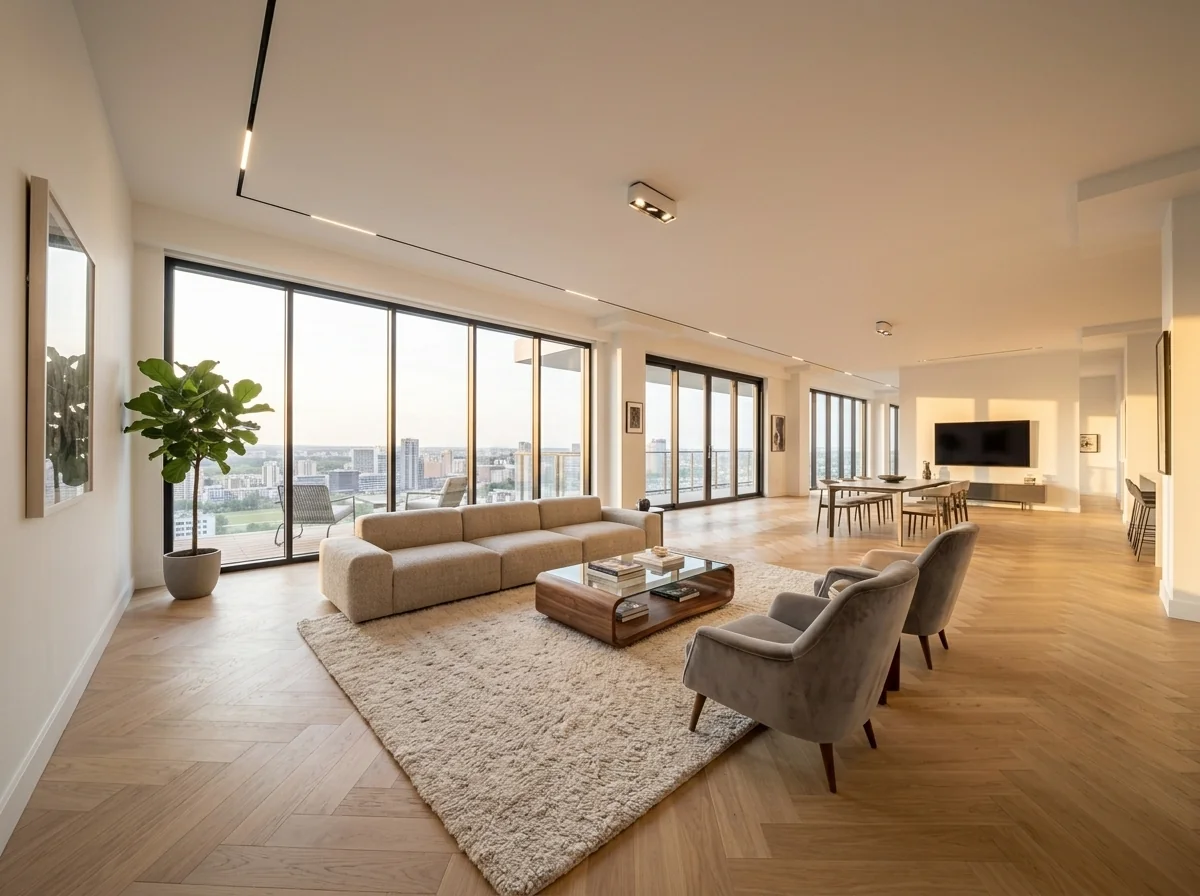
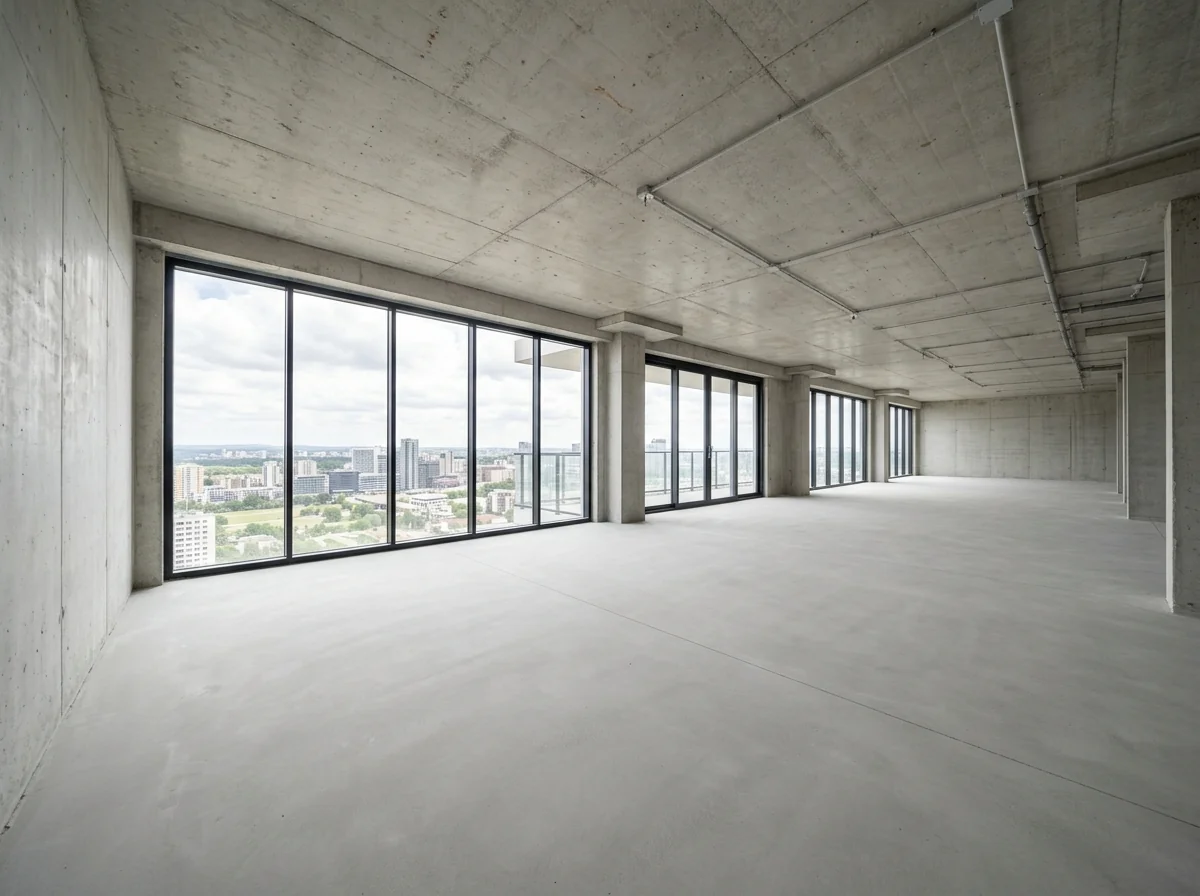
工作原理
- 1上传你的照片
- 2选择你的设置
- 3您的图片
获得好效果的提示
明亮、清晰的照片
日光和广角能带来最佳效果。
展示整个区域
把你想要更改的内容完整地保留在图片中。
尝试多个变体
在决定之前比较不同选项。
常见问题
我可以将图片用于商业用途吗?
可以。你可以将图片用于任何用途,包括商业用途。
我的原图会改变吗?
不会。你的原图保持不变,你可以随时下载。
如果我不喜欢结果怎么办?
尝试另一种风格或设置,或用简短指令优化结果。
继续探索
全部工具


阅读完整指南
What image formats does the Shell-to-Dream-Home Visualizer support for property listings?
Upload your raw shell photos in JPG, PNG, or WEBP formats. Our AI engine processes these files to transform bare concrete and brickwork into fully staged dream apartments, ensuring compatibility with major platforms like Zillow and local MLS databases for every real estate agent.
What is the ideal input resolution for the Shell-to-Dream-Home Visualizer to ensure professional quality?
Aim for a minimum resolution of 1920x1080 pixels. Higher resolution inputs allow the AI to accurately detect textures like screed or bricks, resulting in a more realistic home staging output that brokers can use for high-end marketing brochures.
How long does it take the Shell-to-Dream-Home Visualizer to convert a shell into a staged room?
Generate your virtual transformation in under 30 seconds. The AI instantly analyzes the architectural structure, applies modern plastering, and adds furniture, allowing property photographers to provide rapid turnarounds for urgent property listing deadlines.
Can I download high-resolution exports from the Shell-to-Dream-Home Visualizer for print marketing?
Download your finished visualizations in 4K high-resolution directly from the dashboard. Enhance your print brochures and digital listings with crisp, professional-grade imagery that helps buyers visualize the final potential of any unfinished construction site or shell.
4 Technical Shell-to-Dream-Home Visualizer Tips for High-Res Real Estate Photos
How to use the Shell-to-Dream-Home Visualizer for professional MLS property listings
Tips for your photo
Upload High-Contrast Shell Photos
Transform raw brick or concrete surfaces into smooth walls by providing clear, high-contrast images that help the AI distinguish between structural elements and empty space for better home staging.
Capture Wide-Angle Room Perspectives
Stage your property listing effectively by using wide-angle shots of the Rohbau, allowing the AI to visualize flooring and ceiling transitions across the entire unfinished room layout.
Optimize Natural Daylight Exposure
Enhance your Shell-to-Dream-Home Visualizer output by shooting during the day, as natural light helps the AI accurately place realistic shadows and textures on newly rendered interior surfaces.
Ensure Minimum 1024px Resolution
Convert low-res snaps into professional MLS-ready visuals by uploading files at least 1024px wide, ensuring the AI maintains sharp details during the complex shell-to-apartment transformation process.
Select Standard JPG Formats
Accelerate your broker workflow by using standard JPG or PNG formats, which allow the Shell-to-Dream-Home Visualizer to process structural data quickly for rapid Zillow or property portal uploads.
5 Expert Tips for Shell-to-Dream-Home Visualizer Results
How to use the Shell-to-Dream-Home Visualizer for MLS-ready property listings in 2024
Frequently asked questions
How do I fix lighting errors in my Shell-to-Dream-Home Visualizer renders?
Adjust your source photo exposure before uploading to the Shell-to-Dream-Home Visualizer. Ensure even lighting on concrete surfaces to help the AI distinguish between shadows and structural elements. Enhance the property listing by using high-dynamic-range (HDR) images, which allow the tool to accurately place virtual furniture and realistic textures onto raw brick or screed floors for the agent.
What is the maximum resolution for a Shell-to-Dream-Home Visualizer export for MLS?
Export your finished home staging projects at 4K resolution to ensure clarity on MLS and Zillow. Upload high-quality raw files to the Shell-to-Dream-Home Visualizer to avoid pixelation during the AI transformation. Transform low-res images by using our built-in upscaler before finalizing the virtual renovation of your unfinished shell construction to impress every broker and buyer.
How can I improve prompt engineering for specific floor types in the Shell-to-Dream-Home Visualizer?
Refine your results by specifying materials like 'oak parquet' or 'polished concrete' in the prompt field. Stage the room by describing the desired furniture style, such as 'Scandinavian modern,' to help the Shell-to-Dream-Home Visualizer accurately replace bare brick with plastered walls. This precision helps the agent present a compelling vision of the property listing to potential home buyers.
Why does the Shell-to-Dream-Home Visualizer fail to detect raw brick walls occasionally?
Check for excessive clutter or debris in your original real estate photos. Remove construction tools or trash before using the Shell-to-Dream-Home Visualizer, as these can confuse the AI's geometry detection. Clear the floor area to ensure the tool correctly identifies the transition between walls and floor, allowing for a seamless virtual home staging of the shell construction.
How do I maintain architectural consistency across multiple Shell-to-Dream-Home Visualizer images?
Use the 'Style Reference' feature to keep the same flooring and wall finishes across different rooms. Convert multiple raw construction photos into a cohesive property listing by applying the same design parameters in the Shell-to-Dream-Home Visualizer. This ensures that the broker provides a professional, unified tour of the future dream home for investors and high-end real estate clients.
Is the Shell-to-Dream-Home Visualizer output legal for Zillow and real estate broker listings?
Comply with MLS and Zillow regulations by adding a 'Virtually Staged' watermark to your Shell-to-Dream-Home Visualizer renders. Enhance transparency for home sellers and buyers by clearly labeling AI-generated transformations. This practice maintains broker integrity while effectively demonstrating the potential of a shell construction through advanced virtual home staging technology and high-quality real estate photos.
6 Technical FAQ: Shell-to-Dream-Home Visualizer Optimization
How to use the Shell-to-Dream-Home Visualizer online for free to boost property listings in 2025
Common mistakes
5 Shell-to-Dream-Home Visualizer Mistakes to Avoid for Real Estate Agents
How to shell-to-dream-home visualizer online for free in 2026
Uploading photos where construction debris or scaffolding blocks the main structural lines of the shell.
Obscure the AI's ability to detect wall boundaries, leading to distorted room dimensions in the property listing.
Remove large debris and ensure corners are visible before you upload to the Shell-to-Dream-Home Visualizer.
Using fish-eye lenses that warp the Ziegelsteine or concrete walls beyond natural human perspective.
Create unrealistic virtual staging that looks fake on MLS, confusing potential buyers about the actual square footage.
Capture real estate photos at a standard 16mm-24mm focal length to ensure accurate AI wall plastering and floor application.
Taking photos in near-darkness or with heavy shadows on the Nacktbeton and Estrich surfaces.
Prevent the AI from accurately applying textures, resulting in grainy or inconsistent finishes in the final dream apartment.
Enhance natural light or use professional flashes to illuminate the shell before starting the AI transformation process.
Selecting ultra-modern furniture styles for a rustic shell conversion intended for traditional Zillow buyers.
Decrease the conversion rate of the property listing by creating a visual disconnect between architecture and interior design.
Match the virtual staging style to the local broker market expectations to maximize the impact of your visualization.
Failing to account for low-hanging pipes or structural beams when selecting the final room layout.
Result in virtual furniture clipping through structural elements, which looks unprofessional to high-end investors and developers.
Stage the room by acknowledging structural constraints to provide a realistic visual answer for potential home buyers.
3 Stunning Shell-to-Dream-Home Visualizer Results for Real Estate Agents
Real results from shell-to-dream-home visualizer — learn how to shell-to-dream-home visualizer online for free to sell properties faster on Zillow
Your workflow
4 Steps to Master the Shell-to-Dream-Home Visualizer for MLS Listings
How to use the Shell-to-Dream-Home Visualizer to sell shell properties on Zillow in 2025
Capture & Prepare
Capture high-resolution photos of raw concrete, brickwork, or screed using a wide-angle lens to allow the Shell-to-Dream-Home Visualizer to accurately map spatial dimensions for virtual plastering.
Remove large construction debris from the frame so the AI staging algorithm identifies floor boundaries perfectly for the agent.
Upload & Configure
Upload your raw construction images to PropStage.ai and select the Shell-to-Dream-Home Visualizer mode to apply modern wall finishes, flooring, and designer furniture styles automatically.
Select the 'Modern Scandi' style to maximize buyer appeal and click-through rates on competitive property listing platforms.
Review & Refine
Evaluate the AI-generated lighting and textures to ensure the virtual renovation meets local building standards and provides a realistic preview for property photographers and investors.
Use the refinement tool to adjust specific textures if the original brickwork requires more coverage for a seamless finish.
Export & Publish
Export your high-definition renders and upload them directly to MLS, Zillow, and Realtor.com as 'Virtually Renovated' images to increase broker leads and buyer engagement.
Always include a watermark or disclaimer on the property listing stating these are AI-generated visualizations of the finished shell.
Use cases
4 Shell-to-Dream-Home Visualizer Use Cases for Real Estate Success
How to shell-to-dream-home visualizer online for free to sell property listings faster in 2024
Real Estate Agents
Transform cold concrete shells into inviting property listing photos for Zillow or MLS using our Shell-to-Dream-Home Visualizer to help buyers visualize the final home staging and layout instantly.
Property Photographers
Enhance your service portfolio by offering Shell-to-Dream-Home Visualizer edits, converting raw brick walls into polished, modern interiors without expensive 3D rendering software for every broker client you serve.
Interior Designers & Home Stagers
Present stunning renovation concepts to clients by using the Shell-to-Dream-Home Visualizer to stage unfinished spaces with modern furniture and lighting before the first brick is even plastered.
Property Investors & Homeowners
Upload raw construction photos to the Shell-to-Dream-Home Visualizer to evaluate investment potential, ensuring the property listing attracts premium buyers looking for move-in ready aesthetics during the shell phase.
7 Technical Specs for the Shell-to-Dream-Home Visualizer: How to transform shell construction into MLS-ready listings
How to use the Shell-to-Dream-Home Visualizer online for free in 2025
3 Steps to Use Shell-to-Dream-Home Visualizer — Quick Start Guide
How to use shell-to-dream-home visualizer online for property listing success in 2025
Upload Raw Construction Photos
Upload high-resolution photos of bare concrete, brickwork, or screed directly into the Shell-to-Dream-Home Visualizer. Ensure the property listing image has clear structural lines to help the AI accurately transform grey surfaces into premium finished flooring for MLS.
Select Modern Staging Styles
Choose a specific interior design aesthetic that converts cold walls into plastered, painted surfaces. Use the Shell-to-Dream-Home Visualizer to stage modern furniture, allowing every agent to show buyers the finished potential of an unfinished property.
Generate High-Conversion Renders
Transform raw construction sites into move-in ready apartments with one click. Enhance your Zillow presence by providing photorealistic visuals that answer how virtual staging helps sell homes faster while maintaining structural accuracy for legal compliance.
Expert guide
4 Expert Shell-to-Dream-Home Visualizer Tips for High-End Listings
How to use a shell-to-dream-home visualizer to sell shell construction properties faster in 2025
3 Essential Steps to Prep Photos for Shell-to-Dream-Home Visualizer
Upload high-resolution JPEG or PNG files (at least 3000px) to ensure the AI detects brick textures and concrete edges accurately. Shoot from a corner at eye level to provide the best perspective for virtual flooring and wall plastering. Avoid blurry shots to maintain professional property listing standards and ensure the sharpest AI-generated textures.5 Best Interior Styles for Your Shell-to-Dream-Home Visualizer Project
Select the 'Modern Minimalist' or 'Scandinavian' style to contrast with raw concrete and brickwork. Match the target demographic of your Zillow or MLS listing by choosing furniture sets that highlight the room's spaciousness. Use the 'High Detail' setting to ensure realistic light reflections on newly visualized hardwood floors and plastered walls.4 Ways to Optimize Input for Shell-to-Dream-Home Visualizer Accuracy
Clear the floor of debris and construction tools before taking the photo to prevent AI artifacts. Natural daylight is critical for the AI to calculate shadows correctly when converting a shell into a dream home. Ensure the camera is level to prevent distorted wall lines, which helps the home staging algorithm align furniture perfectly.3 Pro Tips for Sharing Shell-to-Dream-Home Visualizer Exports on MLS
Download the high-definition renders and include a 'Before and After' slider in your digital brochure to engage buyers. Disclose the use of AI staging in your broker remarks to stay compliant with MLS and Zillow guidelines. Use these visualizations in social media ads to attract investors who struggle to see the potential in raw construction sites.How it works
3 Simple Steps to Master Shell-to-Dream-Home Visualizer
How to use a shell-to-dream-home visualizer for MLS listings in 2024
Upload Your Raw Construction Photos
Upload high-resolution images of unfinished concrete, screed, or brick walls to the Shell-to-Dream-Home Visualizer to begin the digital transformation for your property listing and attract serious buyers.
Select Modern Interior Staging Styles
Choose specific plaster finishes and furniture styles within the tool to answer how virtual staging enhances Zillow listings by converting cold shells into warm, inviting, and fully furnished dream homes.
Download High-Res Marketing Visuals
Generate and download photorealistic renders that help any agent or broker sell properties faster by showing the finished potential of a building site through professional Shell-to-Dream-Home Visualizer technology.
What you can do
6 Advanced Shell-to-Dream-Home Visualizer Capabilities
High-Precision Shell-to-Finished Transformation
Convert raw concrete shells into finished apartments using the Shell-to-Dream-Home Visualizer to maximize your property listing appeal instantly.
Instant AI Staging Speed
Upload raw construction site photos and generate high-resolution Shell-to-Dream-Home Visualizer renders in seconds, allowing brokers to market new builds before completion.
4K Resolution Export Formats
Download your Shell-to-Dream-Home Visualizer results in ultra-HD 4K quality, perfect for large-scale print brochures and premium MLS digital property listings.
Customizable Modern Interior Styles
Stage unfinished spaces with the Shell-to-Dream-Home Visualizer to help buyers answer how much virtual staging cost vs. traditional physical staging.
Precise Architectural Perspective Alignment
Maintain structural integrity of the original shell while the Shell-to-Dream-Home Visualizer applies realistic textures to answer if AI staging is legal for MLS.
Cost-Effective Developer Marketing Tool
Reduce visualization costs by 90% using the Shell-to-Dream-Home Visualizer while providing home staging quality that attracts high-intent real estate investors.
How to use a shell-to-dream-home visualizer online for free in 2026 to enhance real estate photos