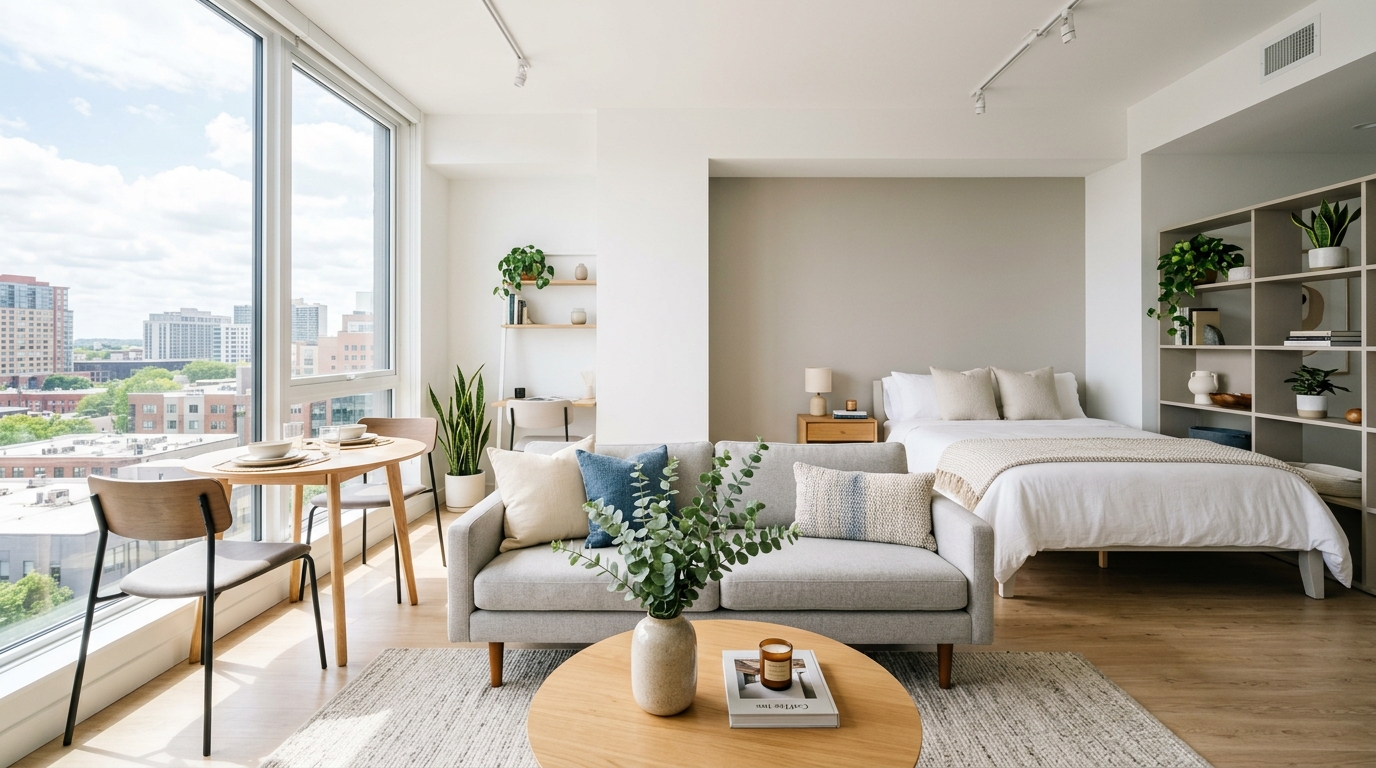
Knowing how to stage studio apartment photos effectively is one of the most valuable skills a real estate agent or property manager can develop. Studio apartments present a unique challenge: they're small, multi-functional spaces where every square foot counts—and where a poorly presented listing photo can make buyers scroll right past. The good news? With AI-powered virtual staging, you can transform a bare or cluttered studio into a stunning, buyer-ready listing image in under 60 seconds. No furniture rental. No staging crew. No waiting days for results.
PropStage.ai has helped over 50,000 real estate professionals solve exactly this problem. In this guide, you'll learn the complete AI staging workflow for studio apartments—from capturing the right base photo to publishing a polished, professional listing image that attracts serious buyers and renters.
Why Studio Apartments Are Uniquely Difficult to Stage
Before diving into the how-to, it's worth understanding why studios are so tricky to stage—and why traditional staging methods often fall short for these spaces.
A studio apartment combines the living room, bedroom, dining area, and sometimes a workspace into a single open-plan room. That's four functional zones competing for the same square footage. When a studio is photographed empty, it looks sparse and undefined. When it's photographed with a tenant's actual belongings, it often looks cramped and personal. Neither version helps buyers or renters visualize themselves living there.
- Empty studios feel cold and fail to communicate livability or scale
- Over-furnished studios look cramped and make the space feel smaller than it is
- Poorly zoned layouts confuse buyers about how the space actually functions
- Personal items and clutter in tenant-occupied units are expensive to physically remove
- Traditional staging costs for even a small studio can run $500–$1,500 per month
AI virtual staging solves all five of these problems simultaneously—and it does it in the time it takes to make a cup of coffee.
What You Need Before You Start
The beauty of AI staging is that your requirements are minimal. Here's what you need to get started:
| Requirement | Details | Why It Matters |
|---|---|---|
| A smartphone or camera | Any modern smartphone works; a wide-angle lens is ideal | Wider shots show more of the space and feel more open |
| Good natural lighting | Shoot during the day with blinds open | Natural light makes AI enhancements look more realistic |
| A PropStage.ai account | Free to get started, no design skills needed | Access to all AI staging and editing tools |
| A clear shooting angle | Corner-to-corner diagonal shots work best for studios | Maximizes visible square footage in a single frame |
| Basic photo file | JPG or PNG, minimum 1MP resolution | Higher resolution = better AI output quality |
You do NOT need to physically clean or declutter the apartment before shooting. PropStage.ai's AI tools can remove clutter, personal items, and even existing furniture digitally—saving you hours of coordination with tenants or sellers.
Step-by-Step: How to Stage Studio Apartment Photos with AI
Step 1: Capture Your Base Photo the Right Way
Your base photo is the foundation everything else is built on. For studio apartments, shoot from a corner of the room at approximately chest height, angling toward the opposite corner. This diagonal composition captures the maximum amount of floor space and gives the AI the most context to work with. Open all blinds and curtains to let in natural light, and if possible, shoot during mid-morning when sunlight is soft and even.
Don't stress about existing furniture or clutter in the shot. The AI handles that in the next step. Just focus on getting a sharp, well-lit, wide-angle image that shows the full room.
Step 2: Remove Clutter and Personal Items
Once you have your base photo, upload it to PropStage.ai's Listing Photo Declutter & Clean tool. This tool uses AI to automatically identify and remove personal items, clutter, laundry, dishes, and visual noise from your photo. For tenant-occupied studios, this step alone can transform a chaotic, unpresentable image into a clean, neutral canvas—without a single physical item being moved.
If there are specific pieces of furniture you want removed—like an old sofa or a dated bed frame—use the Specific Object Eraser to target and remove individual items with precision. This gives you full control over what stays and what goes before the staging begins.
Step 3: Select Your Target Buyer Persona
This is where smart agents gain a real competitive edge. Instead of staging a studio with generic furniture, use PropStage.ai's Buyer Persona Staging tool to style the space specifically for your target demographic. Staging for a young urban professional looks very different from staging for a graduate student or a luxury downsizer—and the right match dramatically increases emotional connection with the listing.
- Young Professional: Clean lines, neutral palette, dedicated work-from-home corner, minimalist decor
- Urban Couple: Cozy double bed zone, small dining table for two, warm lighting and soft textiles
- Graduate Student: Functional desk setup, compact furniture, budget-conscious but stylish aesthetic
- Luxury Seeker: High-end finishes, statement lighting, premium bedding, curated art and accessories
Step 4: Add Furniture and Zone the Space
Now it's time to furnish. Use PropStage.ai's Object Placement Tool to add furniture and decor to your clean studio canvas. The key to staging a studio successfully is zone definition—using furniture placement to visually separate the sleeping area, living area, and dining area within a single open space. The AI understands spatial relationships and will place furniture in proportions that make the room feel organized and livable, not cramped.
For most studios, a well-staged photo will include: a bed or sofa bed with styled bedding, a small sofa or loveseat facing a media wall, a compact dining table with two chairs, and a few carefully chosen decorative accents like a rug, floor lamp, and plants. The AI handles the proportions and perspective automatically.
Area rugs are one of the most powerful zoning tools in a studio apartment. When the AI places a rug under the living area furniture and a different rug under the bed, it creates a clear visual separation between zones—making the studio feel like it has distinct rooms even though it's open plan.
Step 5: Polish and Finalize Your Listing Photo
With your staged image ready, run it through PropStage.ai's 1-Click Listing-Ready Photo Editor for the finishing touches. This tool automatically corrects color balance, adjusts exposure, sharpens details, and straightens perspective distortion—giving your studio apartment photo the polished, professional look of a high-end real estate photographer's work. The entire process from upload to download takes under 60 seconds.
Pro Tips for Staging Studio Apartment Photos Like an Expert
Use Vertical Space to Make Studios Feel Larger
When describing what you want the AI to add, mention tall bookshelves, floor-to-ceiling curtains, or statement pendant lighting. Vertical elements draw the eye upward, making ceilings feel higher and the overall space feel more expansive. This is a classic interior design trick that translates beautifully in photography.
Stage Multiple Versions for Different Marketing Channels
One of the biggest advantages of AI staging is speed—which means you can create multiple versions of the same studio photo for different purposes. Create a bright, airy daytime version for MLS, a warm and cozy evening version for social media, and a luxury-styled version for premium listing platforms. Each version takes under a minute and can significantly expand your marketing reach.
Don't Forget the Kitchen and Bathroom
In a studio apartment, the kitchen and bathroom are often the deciding factors for buyers and renters. Use the Kitchen Declutter Tool to clean up countertops and make the kitchen look pristine. For bathrooms, the Bathroom Renovation Visualizer can show buyers a refreshed space without any actual renovation work. These secondary spaces matter enormously in small-footprint properties.
Create Social Media Content from Your Staged Photos
Your beautifully staged studio photos shouldn't just live on MLS. Use them to create Instagram Story ads, Facebook listing ads, and property flyers that drive traffic back to your listing. PropStage.ai's marketing tools make it easy to turn your staged images into professional marketing assets in minutes.
Listings with AI-staged photos receive up to 87% more online views than listings with empty room photos, according to industry data. For studio apartments specifically—where the target audience skews younger and more digitally savvy—high-quality listing photos on social media are often the primary discovery channel.
Common Mistakes to Avoid When Staging Studio Photos
- Over-furnishing: Adding too much furniture makes a studio look cramped. Less is more—let the AI suggest appropriate scale.
- Ignoring natural light: Always shoot with maximum natural light; it makes AI enhancements look far more realistic.
- Using the wrong buyer persona: A luxury staging style on a budget studio listing creates false expectations and leads to disappointed showings.
- Skipping the declutter step: Even if you plan to fully restage, removing existing clutter first gives the AI a cleaner canvas and produces better results.
- Only staging one room angle: For studios, stage at least two angles—one showing the full room and one focused on the sleeping or living zone.
The Business Case: Why AI Staging Pays for Itself
Traditional physical staging for a studio apartment typically costs between $500 and $1,500 per month, requires advance scheduling, and can take days to set up. AI virtual staging with PropStage.ai delivers professional-quality results in seconds at a fraction of the cost. For property managers handling multiple studio units, or agents with a high-volume listing pipeline, the time and cost savings compound quickly.
Beyond cost savings, staged listings simply perform better. They spend fewer days on market, attract more qualified inquiries, and often command higher offers or rental rates. For a studio apartment where margins are tight and competition is fierce, a 60-second AI staging session can be the difference between a listing that sits and one that closes fast.
Conclusion: Transform Your Studio Listings Starting Today
Staging studio apartment photos no longer requires a physical staging crew, rented furniture, or a significant budget. With PropStage.ai's suite of AI-powered tools, you can take any studio apartment photo—empty, cluttered, or tenant-occupied—and transform it into a polished, buyer-ready listing image in under 60 seconds. The workflow is simple: clean, persona-stage, furnish, and polish. Each step takes seconds, and the results speak for themselves.
Whether you're an agent looking to move studio listings faster, a property manager trying to reduce vacancy rates, or a photographer expanding your service offerings, AI staging is the smartest tool you can add to your workflow right now. Start with your next studio listing and see the difference a 60-second transformation can make. Try the Buyer Persona Staging tool today and stage your first studio apartment photo for free.